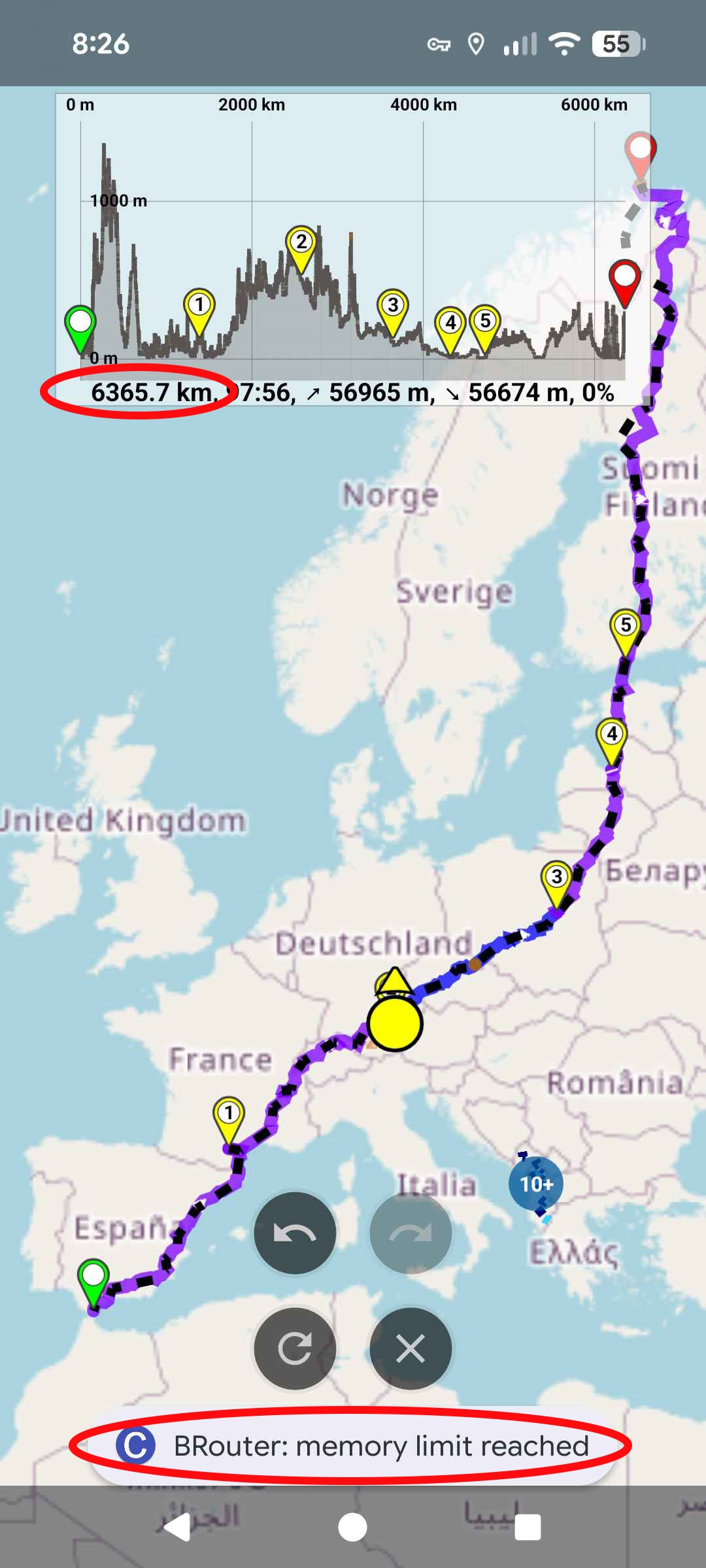
Well that’s exactly what I figured out and the reason writing this post.
But I am unable to cut or split it due to it crashes right after opening the app.
Lass mal auf deutsch weitermachen.
Bekommst du die Route noch am PC geöffnet, dann dort aufteilen.
In der App erstmal die automatische Neuberechnung ausschalten.
Du kannst auch mal den Flightmodus versuchen.
Wenn du aber die App gar nicht mehr starten kannst… Oups da fällt mir nur die Neuinstallation ein. Dann wäre die Route aus dem App erstmal raus.
Am PC im Webbrowser wurde die Route gar nicht angezeigt!
Wie gesagt: in der Android App konnte ich NICHTS mehr machen oder gar die Neuberechnung ausschalten! Nichts ging mehr!
Cache löschen brachte auch nichts.
Also habe ich den gesamten Speicher der App gelöscht. Ich wurde ausgeloggt und alle Offlinekarten waren gelöscht. Also wieder neu laden. Aber wenigstens ist nun die große Route weg und ich kann die App wieder benutzen.
Danke Dir für die Tipps!
Cache löschen brachte nichts.
Also habe ich den gesamten Speicher der App gelöscht. Ich wurde ausgeloggt und alle Offlinekarten waren gelöscht. Also wieder neu laden. Aber wenigstens ist nun die große Route weg und ich kann die App wieder benutzen.
So eine große Route habe ich nur etstellt um die Ableistung von kurvigers Routing zu testen
Same for me, I tried to open a 5000+ km route in the Adroid App. Crash on both Google Pixel Tablet and Pixel9 Pro XL. So its not about, say, weak phones with small memories. It appears to me this is a real existing SW bug.
On the web planner on the notebook, there is no issue loading the route.
I read the “solution“ not to load long routes and to divide them into smaller segments. Additionally, I hear voices in this thread that noone would need such long routes. I do not agree. Both is imo needed and useful. So I do re-open this thread.
I am planning a tour in this magnitude, too. It is reallly useful to plan even very long tours in one thread, so you get a good impression about the total duration and mileage. When you have got everything together, it is still time to split it into the daily segments. Imagine also that you plan a long tour and you do not care about daily segments, as you have enough time to decide every day how far you follwo your route.
So there is no real reason apart from Kurviger crashing reliably not to plan long tours. I consider this a clear bug as it does only appear in the app. Please reopen the thread and kurviger team, please take this serious and provide a fix.
It is not a bug, it is a technical limitation of the underlying technologies that Kurviger uses. It is not related to your phone’s memory nor it’s processing power, but to the amount of data the external software components can accept as input. @boldtrn already commented on this in another thread:
So, there is apparently no quick fix for this limitation, as Kurviger probably does not have the leverage to enforce the change of the external software components.
The workaround is to split the route in 2-3 sections.
One thing that should not happen is - the app should not crash. It should report the limitation and offer a solution to the user (split or shorten the route).
I still do disagree. Even if it is the limitation of an “external component“, whatever it means, this is not a tolerable behaviour of a piece of SW. It may throw an exception, report some error, you name it. There is always a solution. But just quietly crashing and while some other part/library… (“not my problem”) is no good developer practice. If it is known, it needs to be handled.
I do point this so clearly out as the user experience is fatal in this case, once it occured. The app will not start anymore and crash on each invocation. A not technical savvy user will not be able to get it working again. He/She will not understand and use the concepts of erasing caches or memory. Not even an uninstall without this prior intervention will heal it. Deadlock for the user. I insist on asking to fix this at least into a soft landing.
For those defining what shall be a sensible way of planning or not, I am not a person who has the only valid opinion about it. I clearly would like to emphasize, it’s not about this topic and I do not judge this. It’s is 100%Software Engineering Topic I talk about.
Just to avoid misunderstanding - I think your use case is valid, although not a very frequent among users. If you read the other thread qouted above, you might get a glimpse of what the technical issue is. My understanding is that the maximum lenght of the URL that your browser supports is the limiting factor and this varies on different system configurations. This limitation is not something a small company like Kurviger can tackle on its own, so we have to settle with shorter routes - at least for now.
This is what I 100% agree with. I am strongly supportive of defensive programming and apps handling the exceptions without compromising the basic app functionality.
OK, understood now. So the whole route seems to be encoded in the URL string… oops. Now I understand what the limitation of the “external component” is… this indeed is a limitation.
It is not Kurviger related. When I do an Overpass Query to select data from OSM, let me say all Edeka supermarkets in Germany, it is easy on PC. On my phone even of a quite small area let the browser freeze. It is then only about 5 to 10 MB, sounds not so big, but the browser freezes and dies.