App Navigation not telling me to turn.

Hello,

I started a test subscription yesterday and took my first short drive with Kurviger running on my Android Z Fold phone. (I was not connected to Android Auto for this trip.) For the first two turns of my ride, one a left onto an expressway (A hard 90-degree turn), and the other a gentle right taking an off ramp, all Kurviger kept saying was keep left, keep left, keep left. It never said Turn Left. Then to exit the expressway, keep right, keep right, keep right. It never told me to turn or exit.

After exiting the expressway, Kurviger did tell me to turn right, but not until I was already turning, too late to have been of assistance if I didn’t already know where we were headed. I don’t see an option to tell the App to update me sooner, or understand why it didn’t tell me to turn. Am I missing something in the settings?

I’m going to take another short trip tomorrow and then hopefully a longer one into the mountains this weekend to test the app. It’s the long trips into the mountains that matter the most, I need to know a couple hundred yards out (at least) if I need to turn.

Thank you for your time!
Welcome!

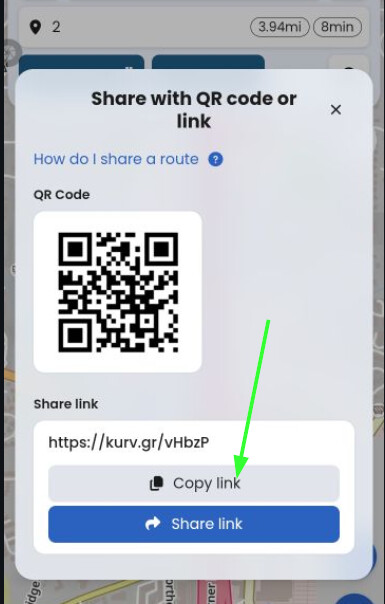
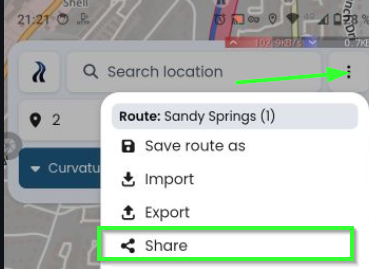
Please share the link of your route (relevant part is sufficient, in case of private data) from your phone by upper right menu - Share. Then copy the link and paste here.

From my experience the announcements are early enough, some hundred meters/yards. Sudden or too late - I cannot confirm. Perhaps you set some waypoints which override the announcement?

The keep right instead of turn right depends (to my experience) on the angle where the road is splitted. When you share the route, it is easier to understand.

Toffel,

Thank you! I am attaching the file here. The first left turn you will see is at Hwy 20 turning left onto 19. The exit on the right at the end of the expressway is slight, maybe that affected the app. Since I’m new to this app I also wanted to eliminate user or settings errors on my part.

However the right hand turn onto Abernathy is sharper, and that’s where it said turn right, after we were already rounding the turn. The app did announce the next turn onto Glenlake Parkway, and the left turn into the facility we were going to, which seems a bit incongruent to me.

I’ll have another small test locally tomorrow afternoon, and then be trying the app in the mountains, which will be the biggest test for me. The environment there does not lend itself to glancing at phones/displays as I’m sure you understand.

Thank you again for your response and time!

Regards,

Steve

Sandy Springs.gpx (63.9 KB)

When you share a file by email or here in the forum with Kurviger users, please do it next time this way. The file is shared in original format of Kurviger and contains all information like waypoints, shaping points, name, how curvy and avoidance. With gpx a lot of information is lost. For now it is fine.


Then:


No, you missed no setting.


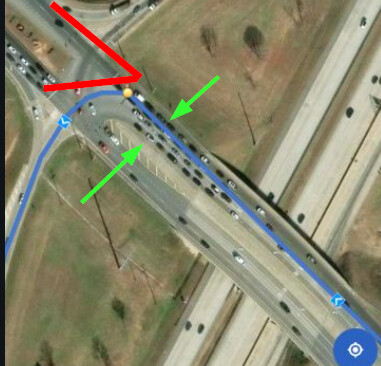
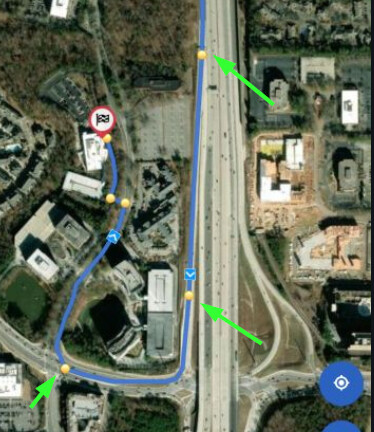
First situation: I simulated and the announcement was “keep left”.
When I look at this situation, I can drive straight or turn left, possibly there are arrows on the road or signs, which forbid to turn left, when you are on the right lane. I see a lot of lanes and Kurviger´s advice is to “keep left” (3 announcements). Also what I supposed is that the angle is not really sharp.

For me it would be fine, I know I should orientate to the left. Sure, we could discuss about the last announcement, but as I experienced the announcement does not change.
May be a thing of personal taste if “turn left or keep left” - it depends on the situation.


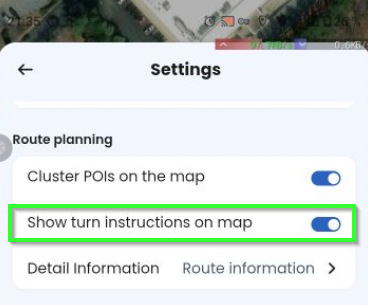
You can change one setting to better understand when there are turn instructions.

Check this:

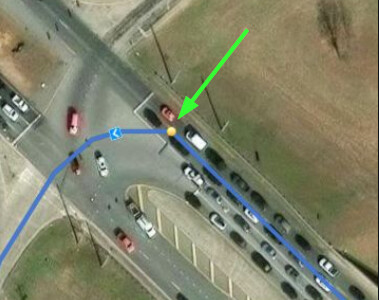
You see little yellow dots. For these points there should be turn instructions.

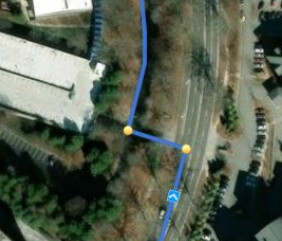
Second situation: Again no sharp corners. Roads with several lanes, so “keep right” would be fine for me. Between the two lower points, we have a curve, but as we have no alternative as far as I can see, no turn instruction is required.

Here we have sharp turns and no alternative lane. Instruction is here “Turn left, then turn right”.


I checked when the turn instructions are announced. I know here in Europe, first annoncement is 1 km, then about 300 m short before the turn - so normally up to 3. No setup or configuration.

For miles - you might double check tomorrow.

  • 1 Mile = 1,6 km
  • 1000 ft = 300 m
  • 100 ft = 30 m

To be honest: 1 Mile = 1.6 Km - I would have forgotten what Kurviger has told me, even that Kurviger told something at all. I would say for miles something in between could be heplful?


So, not really solved anything, but hopefully explained a little bit. Let us know your experience and discuss.

Toffel,

I wanted to cut/delete the first part of the route, but couldn’t figure out how to do it in the app, so I shared it as a GPX file which I know how to cut. I will try to figure that out. I may be misunderstanding you here, but I did have to turn left onto 19? Since I know the route I had already driven over into the left turn-only lanes, maybe that played a role; I’ll try to keep that in mind. Show turn instructions on the map is on, and I will be connected to Android Auto tomorrow. Perhaps that will assist me in determining what to expect the app to say.

I’ll see if I can figure out how to clip the front of the short route I had planned for tomorrow, so I can share it without privacy concerns, and just create a new one if not. My goal is to cross over a section of the road I drove earlier on the route and then take a different turn at the end. Veer slightly off course, and then get back on course to see how the app responds. This happens during the mountain runs I’ve made, whether due to an accident in front of me or a restroom break. It appears I can just pause the route in Kurviger and then restart it, which should satisfy my needs.

Thanks for your time and assistance,

Regards,

Steve

Mir wird auch des öfteren an sehr starken Abbiegern (oberhalb von 90°) angesagt rechts halten, wo hingegegen sehr leichte Abbieger mit rechts abbiegen angesagt werden.

Ich habe mir oben anhand des Beispiels Mühe gegeben - zumindest für mich und meine kleine Welt - es zu erklären. Kann auch völliger Unsinn sein. Kannst Du dem oben folgen oder an welcher Stelle siehst Du es anders?

Es ging nicht gegen dein Beispiel, sondern war nur eine allgemeine Anmerkung und bezog sich auf einen völlig unkomplizierten Abbiegevorgang auf einfacher Strasse nach rechts ohne spezielle Fahrbahnanforderungen. Warum macht Kurviger des öfteren diesen von mir beschrieben Unterschied in der Ansage,spitzer Winkel „rechts halten", und andere wiederum „rechts abbiegen", egal in welchem Winkel diese abzweigen.

Zum Thema: Abbiegen bedeutet für mich, die Strasse zu verlassen und mich auf mehrspurigen Strassen automatisch auf die Fahrspurseite zu begeben, in deren Richtung ich abbiegen möchte.Mir würde die eindeutige Ansage rechts oder links abbiegen genügen.Eine andere Möglichkeit auf mehrspurigen Strassen wäre, die ersten Ansagen mit halten und die letzte, direkt vor dem Abbiegen mit abbiegen anzusagen, das verlange ich aber gar nicht.

Kurviger “liest” die OSM-Daten aus. Bei jeder Kreuzung, bei jeder Abbiegung, etc sind gewisse Gradzahlen hinterlegt, die von Kurviger ausgewertet werden und entsprechend mit den Abbiegehinweisen wie “scharf rechts”, “rechts halten”, ausgegeben werden.

Wenn man sich an Kurviger gewöhnt hat, dann weiss man aus Gewohnheit, was Kurviger meint.

Ich sehe das jetzt nicht als “Ausgabefehler” an, sondern eher eine Art Besonderheit von Kurviger.

Um es noch mal deutlich zu sagen, hat Kurviger momentan keine andere Möglichkeit, als die OSM Karten entsprechend deren Kartographie auszulesen.

Robin, korrigiere mich bitte, wenn ich das in meinen einfachen Worten etwas verdreht dargestellt haben sollte.

Es war keinesfalls eine Beschwerde, es war nur eine Anmerkung. Ich nutze kurviger schon viele Jahre, diese Art Abbiegeansage kommt nicht oft vor und habe mich daran gewöhnt. . Da kann ich mir nur vorstellen, daß es an falsch hinterlegten Gradzahlen in OSM liegen kann. Ich war nur neugierig wie es zustande kommt. Nun weiß ich woran es liegen könnte und alles ist gut. Im Übrigen bin ich sehr Überzeugt von Kurviger, ich finde es einfach klasse! viele Grüße aus Schleswig-Holstein

Ich habe es auch nicht als Beschwerde aufgenommen.
Dennoch meine ich, dass Hintergrundwissen über Funktionalitäten gern geteilt werden kann. :wink:

Trip

I’ve read through the prior posts and it appears that that I’ll have to learn when the app says stay right that it means turn, or not. The app said stay right only once on this route, when turning off Suwanee Dam onto GA 20. The rest of the time it warned me in advance and told me to turn, which is what I am looking for.

I also went down part of the route twice, turning right the first time and left the second time and the app kept up just fine, which is really good.

Most of the roads in the N GA mountains are two lane, which appears to matter to the app as to whether it tells me to turn or not. My main concern with missing a turn is sometimes it’s a few miles before the option to turn around presents itself. Looking at the phone or NAV via Android Auto is occasionally just not a safe option in the mountains. I’ll just have to take a trip up there this weekend to see how the app handles the required turns.

I thank you for your time.

Regards,

Steve