My chigee aio 5 with carplay/ios, shows map only on dark mode. On iPhone light mode. I don’t know what happened, at the beginning was correct. I didn’t change anything in the meantime. Suggestions?
Hi Kirk and welcome! 
My understanding is Chigee AIO 5 just mirrors your iPhone screen, right?
If your iPhone shows the map in day-mode but on the Chigee it is shown in dark/night-mode … than I guess there is a setting in your Chigee which is causing it. Please, check!
Regards,
Sascha
Thanks for the answer. I’ll check, but it happened from one day to the next, and was light mode before. I just tried it on the CarPlay of the car ( I’m just returned from a week motorbike journey..) same result. Others nav apps no problem, only Kurviger
Only at Kurviger but not when using other navigation apps!? Okay … that is a game changer.
Please, send us a screenshot of the version you are using. You can find this information when using the Kurviger logo button in the upper left corner and than go to the menu “settings” … scroll down and very at the bottom all version information are written.
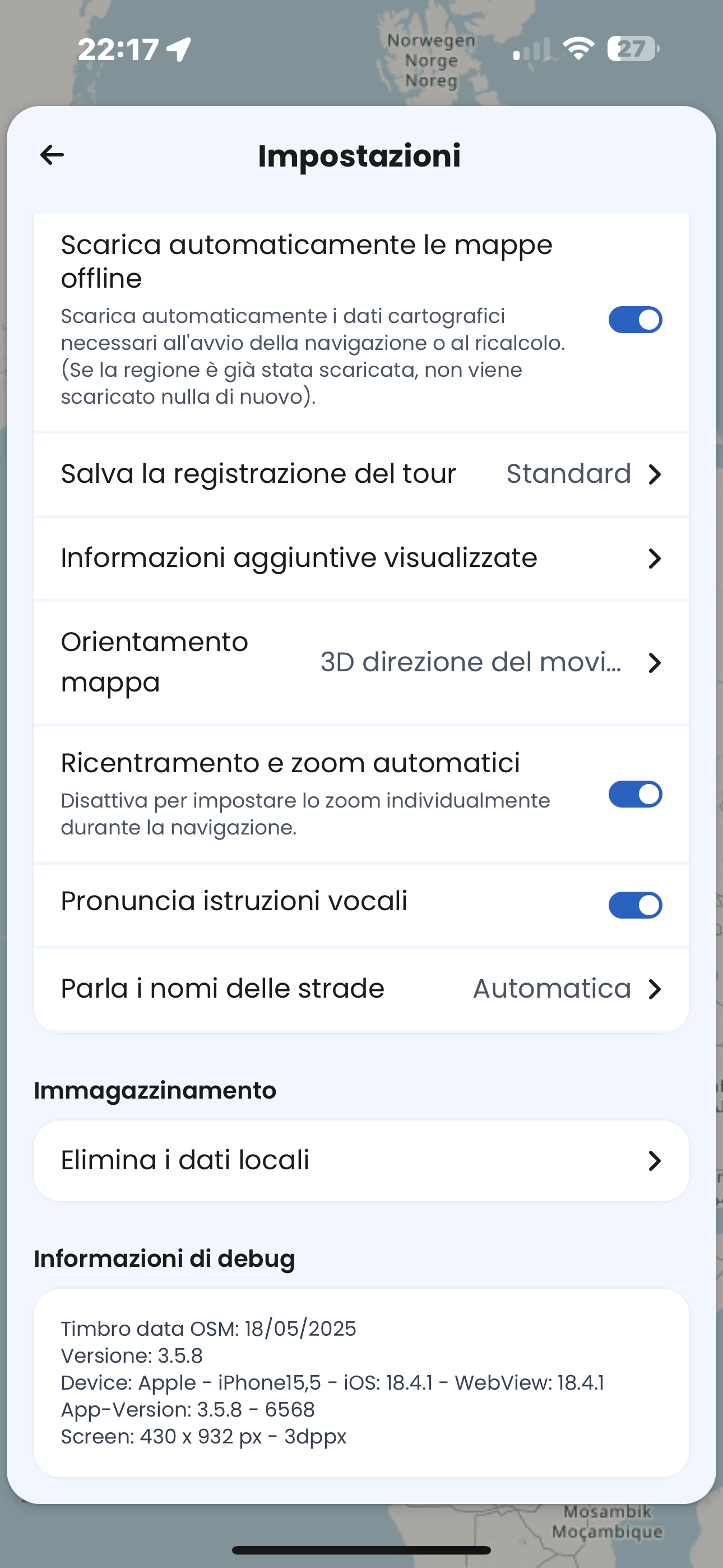
Let’s have the software engineer @boldtrn comment on this:
Robin, Kirk is running a Chigee aio 5 display wich mirrors the display of smartphones. Kirk says all navigation apps are shown perfect on this device but not when he run Kurviger 3.5.8 on his iPhone. There the device is showing Kurviger in night mode only while on the iPhone itself it is running in day mode.
Kirk did not change any settings he says. 
It is weird other nav apps are shown correct in day mode but Kurviger is shown in night mode only. Does that makes any sense?
You have any idea?
THX
I encountered the same problem initially, and I found that the solution was to adjust the Carplay settings directly on the device itself. In my case, it was CarABC.
You might want to look into the setup menu on your device, as there are some settings that can be configured to resolve this issue. Specifically, I noticed that while using Kurviger, the problem persisted, whereas Google Maps displayed the normal day mode without any issues.
If needed I can send a screenshot later…
Cheers!
2 Likes
@Kirk Please, be so kind and re-check the settings of your system. As you can read above it is possible the issue you are seeing with Kurviger is caused by the settings of the Chigee AIO 5 system.
Please, let me know your final results in any case.
THX
Sascha
I checked. My two CarPlay system, chigee and car, can’t be set in light or dark mode, or at least , I looked for in their menu, but I can’t find the function. They seem preset on auto, depending
on the light. It’s weird that Kurviger worked before on CarPlay. As I said in my first post, other apps work, ,right working of Kurviger on cell,now, without apparent reason, is always in dark mode on both CarPlay. I’ll try on my friend’s CarPlay, I’ll let you know. Thanks for all the answers and suggestions. Cheers
2 Likes
Have a look here: Carplay Dark Mode – Carplay-wireless.de
It’s a general CarPlay setting.
Hello Kirk,
Have the same problem with the Carpuride W702.
Do you already have a solution?
Greetings Heinrich
Ok, i solved it with CarPlay settings,as suggested above, and not device (car, chigee) options. Setting CarPlay in auto mode,Kurviger is in auto mode too. It’s weird that before Kurviger was in auto mode with CarPlay in dark mode. Seems that time ago Kurviger followed device options, and now CarPlay options.
That’s it.
Thank you very much.
Probleme mit CarPlay. Bei der Nutzung von Kurviger auf einem iPhone und der Verbindung von CarPlay wird nur ein dunkler Hintergrund angezeigt. Selbst bei Nutzern, die bist jetzt einen helleren Hintergrund hatten wird das jetzt auch nur dunkel dargestellt. Damit ist gerade in dunklerer Umgebung dann kaum noch eine Navigation möglich. wir haben schon alle möglichen Layer ausprobiert. Auf dem Mobiltelefon ändert sich das auch in der Kurviger App, nur nicht bei der Übertragung via CarPlay, da bleibt der Hintergrund dunkel. Wie kann man das ändern oder ist das ein Fehler?
Hallo Reinhold und wilkommen zum Forum!
Dunkle Karten sind genau für dunkle Umgebung angedacht, da kannst du im Carplay auch wenig dagegen machen, selbst wenn du es wolltest. Das heißt, am Abend wird auf Carplay bei allen dunkel.
Nichtsdestotrotz, poste bitte die “Debug Info” aus den Einstellungen (ganz unten), sowie um welche Carplay Geräte es handelt. Dann kann man versuchen das Verhalten zu reproduzieren.
So nicht ganz korrekt. CarPlay hat ein Setting, dass die Karten immer Dunkel sind. Komischerweise gibt es kein Setting für imm hell. Hier die Apple Doku dazu: Einstellungen in CarPlay ändern - Apple Support (DE)
Oftmals ist per Default “always dark” eingestellt. Wir haben auf unserer Seite noch einen Fall für die Hell/Dunkel Unterscheidung verbessert. Das kommt mit dem nächsten Update.
Was ich meinte - wenn Apple meint, dass es dunkel bzw Nacht ist - schaltet Carplay auf dunkles Profil, egal ob du es willst oder nicht…
@REINHOLD hat gemeint, dass in der dunklen Umgebung mit dunklen Karten kaum noch eine Navigation möglich war. Wenn er mit seinen Freunden in Dunkelheit unterwegs war, dann ist kein Wunder, dass bei allen die Karten dunkel waren, egal was in den Einstellungen steht und wie sie es tagsüber hatten…
Und in dem von dir verlinkten Dokument steht auch noch was…:
Das dunkle Erscheinungsbild ist für die Verwendung bei schlechten Lichtverhältnissen optimiert, beispielsweise bei Nacht.
1 Like
Here’s my version. As already discussed, the problem only occurs with Kurviger; other apps run normally and are bright.
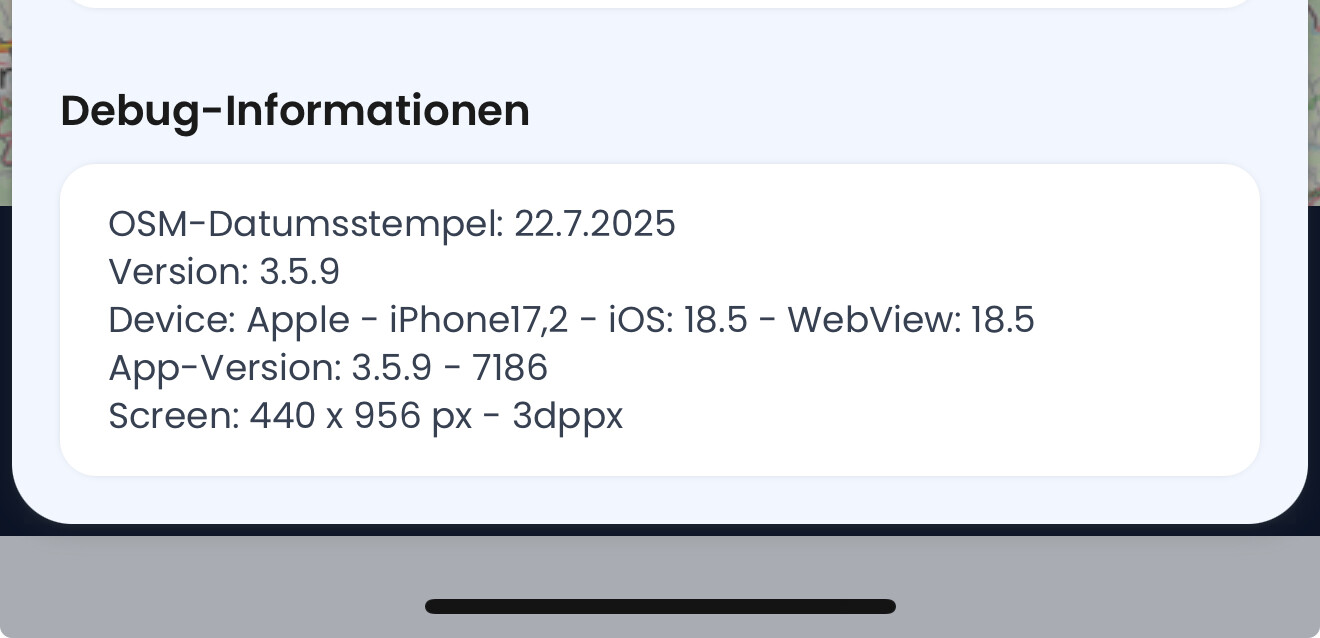
Das ist nicht das Problem, Kurviger und nur Kurviger hat einen schwarzen Hintergrund, auch bei Tag und besten Sonnenschein. Die App selber ist aber hell und man unterschiedliche Layer aussuchen, via CarPlay ist des dann immer nur dunkel.
Herzlichen Dank an das Kurviger Team!
Mit dieser Anleitung habe ich es gefunden. Mir war nicht klar das sich “Einstellungen” in CarPlay von dem Mobilphone unterscheiden. Das war schon verwirrend, weil andere App’s auch teilweise eine direkte Verstellung über die App zulassen. DANKE
2 Likes