Ok, here are the promised screenshots to demonstrate like another app (“MyRoute-app Navigation”) solved the workflow for moving waypoints.
The editor always has a visible crosshair (I know there’s an option for that in Kurviger, but I never understood what to do with that crosshair):
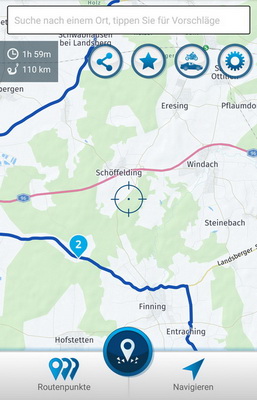
Tapping on a waypoint (like here number 2) brings up its context menu, which has a move option (red arrow):
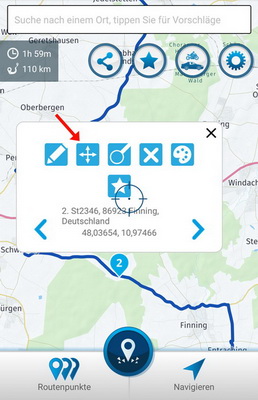
After tapping this move botton the context menu disappears and the name of the waypoint is displayed in a dialog (together with an “Abbrechen”/“abort” button):
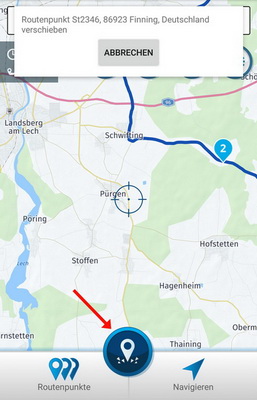
In this view it is now possible to move and zoom the map, so that the crosshair finally sits at the new location the waypoint should be moved to. Then you simply tap on the “waypoint” button (red arrow in the upper screenshot) and the waypoint is moved to that position (and now you have an “undo” button to move it back to its original position):

In my opinion this workflow is much easier to handle than being forced to hold a waypoint all the time to move it to a new position. Especially because you can freely move and zoom the map for selecting this new position. Very accurate and less risk to “loose” the waypoint while dragging like in the Kurviger app. And it is much more comfortable to move the waypoint to a new position outside the map area currently displayed (in the Kurviger app it is somehow tricky to move the map while holding and dragging a waypoint).
Maybe this could be a hint how to redesign the “move-workflow” in the Kurviger app some day. Probably if a context menu for waypoints will be introduced.
By the way: although it looks like the MyRoute-app Navigation app has more or better functionality it fails in many vital functions and workflows if being used on the road. MyRoute-app has its own forum where many suggestions of the users had been posted - but the MyRoute team very seldom answered the questions or feedbacks. And a few days ago they even DELETED almost all those posts and discussions! In my opinion this is absolutely No-Go!
This is completely different here and (in addition to the great functionality of the Kurviger app) one of the reasons why I switched from “MyRoute Navigation” to Kurviger.