where is the voting ?
okay, you have to see that first, and it really works better,
I had already written that, but whichever path Kurviger decides to take, it should be identical in both worlds, Android and Apple.
2 Likes
Well, if the boss is a fan, then we have nothing to fear… 
Okay, that’s a fair offer. I think those affected will accept that and toggle the switch to the “non-standard representation” themselves. Now we just need the switch under “Appearance”.
7 Likes
I also think this is a good compromise: by default, position in the middle of the arrow like many other apps, with the additional option to select the arrowhead.
This is especially important when riding a motorcycle on small roads. Many other apps target car drivers as their main audience, and to them it’s not as important.
6 Likes
I don’t even want that in a car.
The peak is clear. What else? Middle between the peak and the back straight? Intersection of all perpendiculars?
I just want to make it clear that the peak can be assigned immediately, and that nothing of the map is covered up even then.
But I can live with adjustable.
7 Likes
What a discussion, I’m learning about aspects that were completely foreign to me. Interesting perspectives. 
Up until now, I assumed that the position indicator is just an estimate anyway. The three hundred meters before the turn sometimes feel more like fifty meters. 
After reading along here, I now want to have a crosshair. 
But no matter how that gets solved, Kurviger remains the navigation system of my choice. I’ve tried out a lot and for me, Kurviger is the best overall package.
What I really appreciate is that it’s continuously being further developed. For me, Kurviger has just gotten better and better over the years. I’m optimistic that it will continue this way.
4 Likes
I can only agree with that. 
To bring my own perspective into the mix: I don’t care about the tip or the middle, both are precise enough for me. Honestly, I’m not even sure if I would have noticed the change at all. Not because I don’t see the difference, but because it’s obviously not relevant to me.
When a driving maneuver is coming up, I get a quick overview just beforehand as soon as I see the situation on the display, e.g., “Aha, turn right in a hundred meters, there are two right-hand streets coming up right after each other, I have to take the second one” and when I get to that spot, I take the second street on the right and my focus is on the surrounding traffic situation and not on the nav. Do you guys actually look at the display at that exact moment? No offense intended and I don’t want to step on anyone’s toes, I just genuinely want to understand.
3 Likes
Bin gestern nochmal 100 km im Orts - bis Landstraßentempo unterwegs gewesen.
Beim Passieren von Einmündungen mit Tempo 100 km/h war die Pfeil-Position bei ca. 2/5 von der Spitze. Technisch gesehen, so finde ich, haben die Physiker & Ingenieure das ziemlich gut gelöst.
Dito. Man muss sich halt damit befassen, dann lernt man es immer mehr zu schätzen und erkennt die Vorteile  . Die Diskussionen hier haben sicher auch ihren Anteil daran
Wenn man’s nicht kennt weil’s sonst niemand macht?
Apple mit “Spitze” könnte dem einen oder anderen Jünger ja auch mal die Augen öffnen.
@boldtrn
“Lockito”, schönes Tool, läßt sich bestimmt die eine oder andere Schweinerei mit machen 
Ok, judging by your post history, we have a brave iOS user? 
On my Android, the position was razor-sharp at the tip of the arrow, regardless of speed, with no lagging like a rubber band. Visually dirt roads, side streets, driveways, etc. — I look to the front right and the arrow is also ahead of the “marker”. Sign reached, new speed 70, display switches to 70 (unless mapped messily in OSM). Far away from being an estimate.
Keep a close eye on it. I have zero experience with iOS.
Exactly, of course. Only I can even see the driveway in front of me. “Sometimes 300 m feels like 50” — I count down too, just absolutely precise including driveways in front of me.
It’s not a problem getting from A to B at normal zoom. It’s not a problem when you’re cruising along a route. In Kurviger you can set your preferred zoom, which many don’t do. You set the zoom, now you need orientation, maybe heavy traffic.
Then you have this from Schippy above, that the arrow obscures the situation.
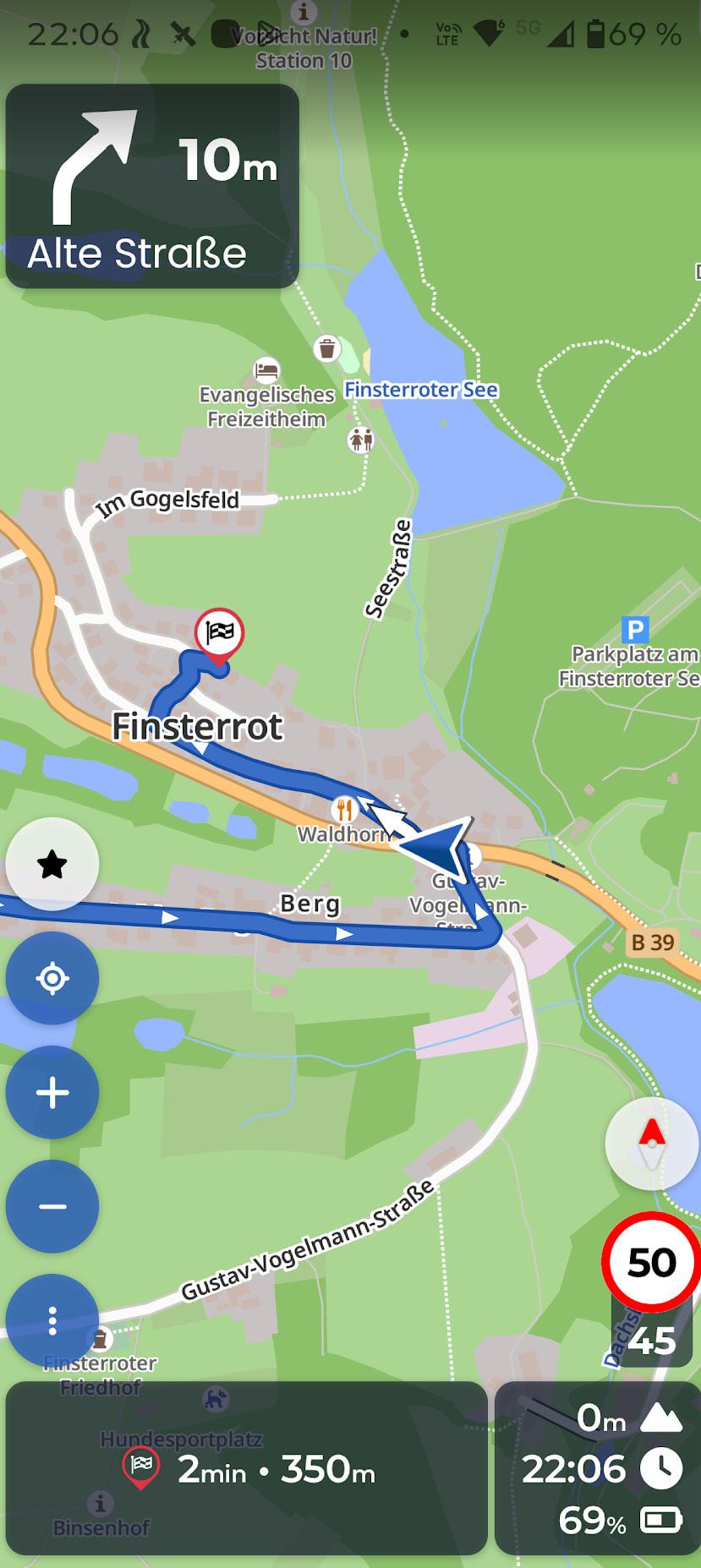
This is what it looks like underneath.
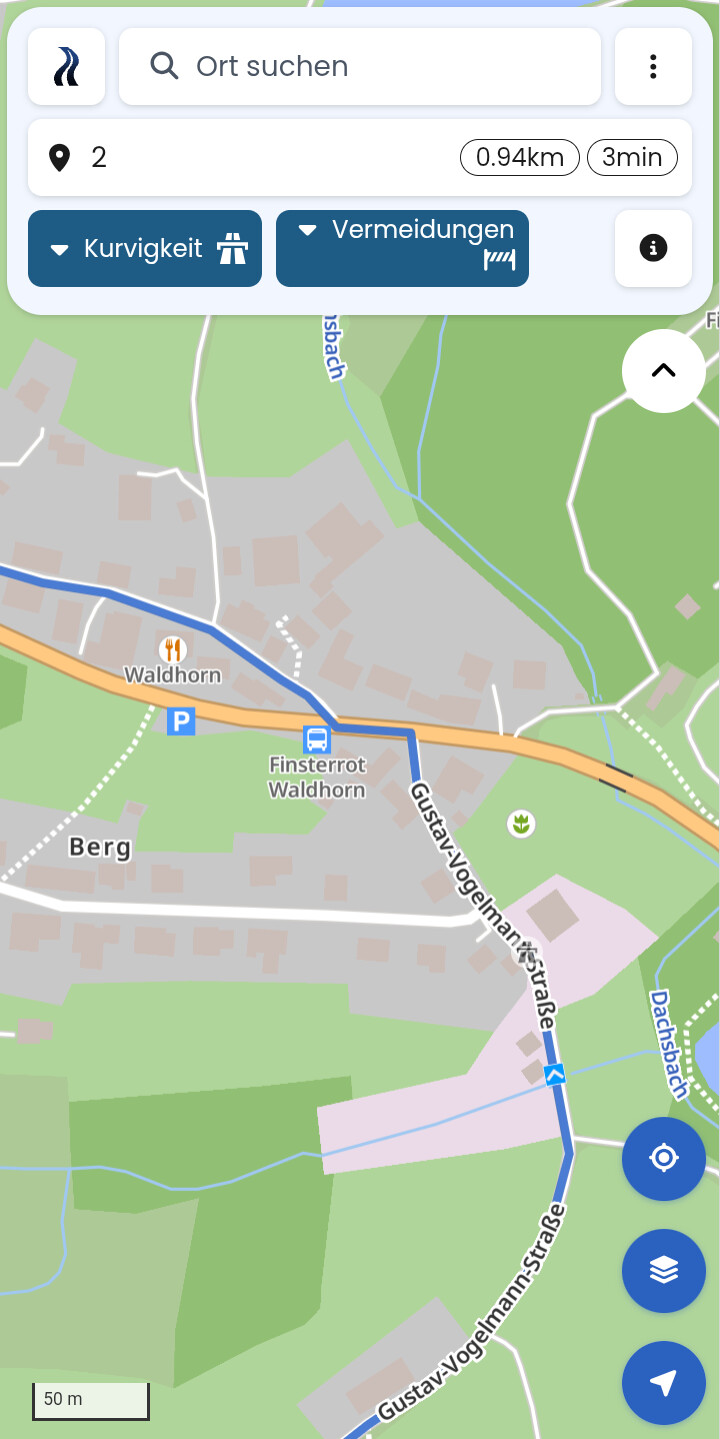
Isn’t that exciting? With the position at the tip of the arrow, you have a clear view at all times. One glance, first left, first right 30 degrees, no question marks in your head.
And now we have a situation where some know where the position is, others think they know, others consider it an estimate, others imprecise, others don’t even notice, others don’t care. Pitiful developers!
Then it’s inconsistent between iOS and Android, and all the other navigation apps (uh, why any other besides Kurviger  ). Changes made without info, as if it didn’t matter or was just an estimate, even though for those who use it, it is or was perfect.
In that respect, I don’t know if making tip/center configurable is enough. The position marker should also make the position clear to the user. Arrow, e.g., arrow tip. If center, then position marker on a dot or a transparent circle around the outside, then it’s simply no longer a pure arrow and the eye finds the center of the circle.
1 Like
I agree with you: if I had to orient myself and decide what to do in this situation based on the image, I would probably be overwhelmed. But I don’t think a “tip” would save me there either. For me, the die would have been cast 100 meters earlier, with a clear view of the spot in question, completely without an arrow nearby. And right at that spot, I would have a different zoom level.
Do you mean by that turning “Autozoom” off and setting the zoom level manually?
1 Like
Yesterday I was able to try the new update for the first time and I have to agree; the arrow is weird. But I don’t think it’s merely the center position as this did not bother me when using the other nav apps.
It’s just that the arrow continuously points “away” in every turn.
I think the other apps do something more with the arrow than merely point in the heading the phone reports. Maybe they do some “magic” to bend it in the expected direction of travel. Or maybe there is some kind of greater delay in Kurviger when reporting the heading that the new arrow exposes.
I stopped on the four-way intersection with the intent of going right. When the green light hit, I turned right immediately, but the arrow still continues forward for a bit and only then it quickly starts to turn. It behaves like a bus that has to swing wide for a turn. In regular sharper turns, the arrow shows a direction “outside of the turn”.
Difficult to say. But the arrow feels somehow wrong. And in towns with more complex layouts, it’s really confusing.
So I don’t think it’s really only the position of the center of the arrow, but there is more to it, why it feels bad. I believe it’s a combination of several things. I’m not really opposed to the change itself, but I think it deserves more investigation and attention.
But between this implementation and the previous, I strongly prefer the previous version. I think also that people should report which view they’re using. I use exclusively “North side up” display. From the screenshots it seems to me, that the dissatisfied users might be all that use this view and in the normal “direction of travel” it is not so pronounced?
1 Like
I don’t understand how anyone can make that claim and that you’re always driving north, especially when you’re driving around in the city, unless there are only Avenues and Streets there, then you can do that.
but whatever, depending on the zoom level, it looks weird in the other displays too
You misunderstand the statement. Perhaps your translation is a bit off. I mean, that my map orientation is set to “North”, not “2D/3D Direction of movement”.

Hello everyone! Perhaps we could consider the possibility of allowing users to choose the “arrow display”. For example, a “crosshair display with direction indicator (a small arrow in the direction of travel)” would be conceivable; it covers (almost) nothing and solves the problems described here…
1 Like
Compare it to a computer mouse. Where the tip is, that’s the position and that’s where you click. That’s logical.
Where the tip is, that’s my position and that’s my line of sight, and that’s where I’m heading.
Clear vote for the arrowhead!
10 Likes
I wouldn’t have been able to tell beforehand where on the arrow the GPS position is, and even now I still couldn’t say. I’ve paid attention to it on my last few rides, but if you’re riding at a reasonably smooth pace, you simply can’t keep your eyes on the screen long enough to distinguish the two millimeters on the arrow. All these examples might be relevant on a static map, but in real life, they are completely irrelevant.
3 Likes