The app constantly makes roadmap photos during navigating. Can I turn this off
Hi tonkeetels.
I am not aware, that there is such a function. I guess there is anything else on your phone triggering photos, perhaps an additional app or you use a remote, triggering it, but surely not Kurviger.
If you can describe your setup in more detail, for example, if there is any interaction with the phone, perhaps someone has an idea. Android, IPhone?
Yesterday I navigated the outbound journey with Kurviger and the return journey with Google Maps. The same problem occurred. So I think the problem is with my iPhone.
Could it be a ‘Add a report’ feature.
Add a crash or ad a slowdown, I don’t know.
If you can solve it, would be great you would drop a note here for future questions. Thanks for your feedback.
I will try this one and let you know.
The “back tap” tree times was set on ‘make a screenshot’
How to Set Up Back Tap
- Open the Settings app on your iPhone.
- Scroll down and tap on Accessibility.
- Under the “Physical and Motor” section, tap Touch.
- Scroll to the bottom of the screen and tap Back Tap.
- Select either Double Tap or Triple Tap.
- Scroll through the list of actions and choose the function you want to assign.
What You Can Do With Back Tap
You can assign various actions to your double or triple tap, including:
- Taking a screenshot
- Launching the camera
- Opening Control Center
- Turning on accessibility features like AssistiveTouch or VoiceOver
- Running custom shortcuts created with the Shortcuts app
- Toggling the flashlight
All photos are taken during a deceleration while braking. Approaching a roundabout or a sharp bend. This might trigger a tap on my iPhone and cause a triple tap.
I cannot find the list of keys used in Navigation.
Can please someone from internal check, if “Back” is used for Zoom? Thanks.
For iPhone we currently don’t support remote controls yet, so nothing should happen from our end here.
What do you mean with “remote controls”.
Do you mean you don’t support iPhone running Kurviger at all.
You were so enthusiastic “If you can solve it, would be great you would drop a note here for future questions. Thanks for your feedback.”
I think with “remote control” something like this is meant. (BarButtons, Carpe Iter etc.)
But I navigate with my iPhone 16 on a motorbike…can’t you help me?
I still have no idea what the problem is.
What are “roadmap photos”, how are they made and what impact does it have on the app functionality. Why do you need “Accessibility” during navigation? Have you tried switching it off?
Maybe you could explain a bit better what exactly is going on and we could come up with some ideas to help you.
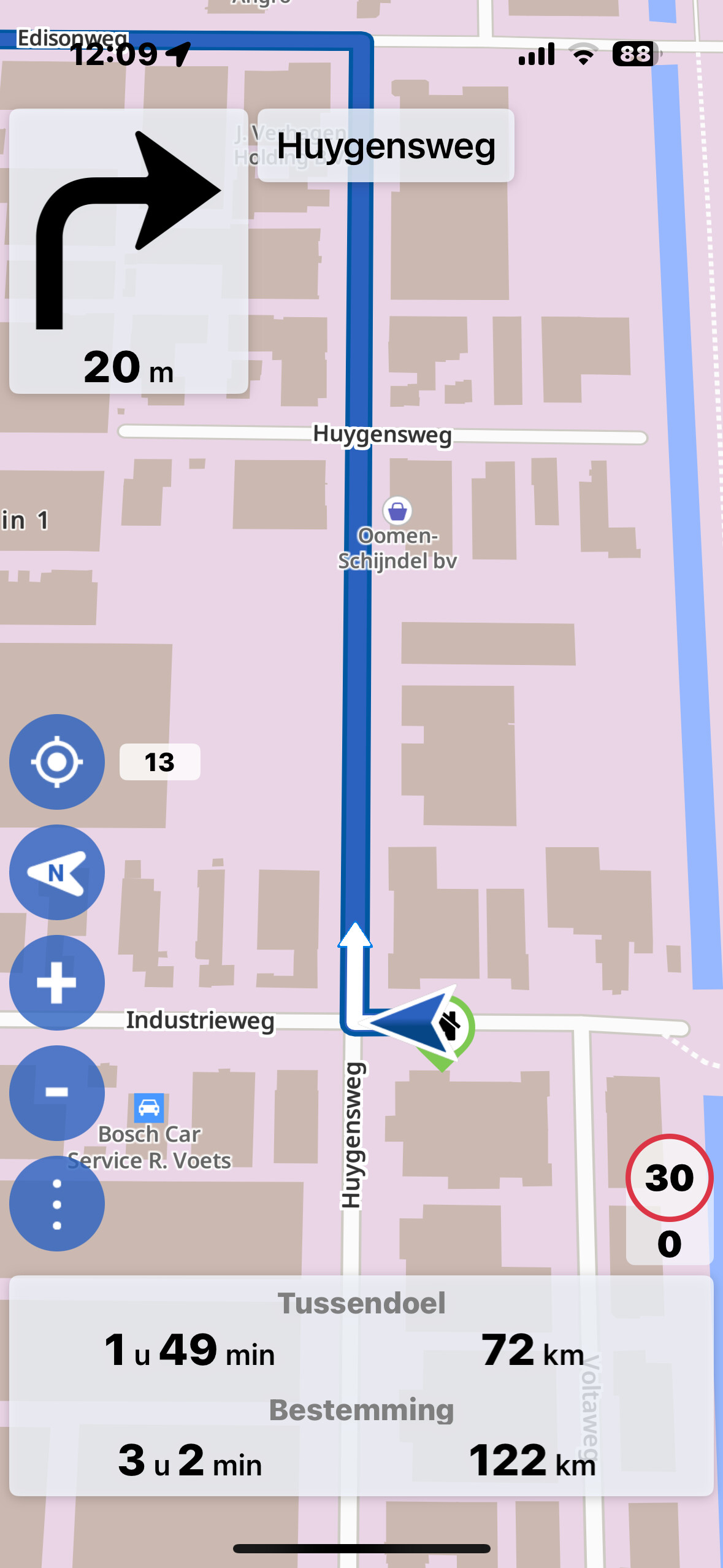
Ok, got it - your phone ist taking screenshots automatically while you ride.
You mentioned that you are using Accessibility features. Did you set Accessibility to make screenshots on your command, but now it happens also when you do not want it to?
And as I understood it happens only on the motorcycle?
It happens also when you navigate with Google maps, not only Kurviger - right?
Thats right, automaticlly screenshots.
What do you mean by “accessiblity features”.
I did not set it. I can make screenshots ofcourse by pussing two buttons, but I don’t do while riding.
I use kurvinger only on my bike.
Yes also with google maps.
I thought you were describing in the previous message, that you were using those. You wrote in your message:
So, you are not using “Accessibility”?
UPDATE:
I looked this up. If this option is on, it is in my eyes the most likely cause of your problems.
“Back tap” uses gyroscope an accelerometer sensors - the same sensors that would be swinging their signals while braking and riding tight curves - e.g., in a roundabout…
I’d recommend switching this off or changing its function (e.g., open the camera app). So if instead of screenshops you get this other function triggerred - then you know what it was and would have to switch it off.
I switched it off, next weekend I have a next ride. I let you know.