The vocal guide stop after few minutes

Hi,

Since the beginning, the vocal guide is not working after 2 minutes(around)
I follow all the different advice given on your website, tried also the 3 différents audio output, but always the same issue. sound on phone or sound across Bluetooth device, same result.

When the audio stop, the only way to make working again is to close the app and restart. (and it will work only for 2 minutes)

if I play a music in same time, the audio guide stop also but the Interesting thing is that when the audio guide should speak, the music level go down few second and go up.

I take à vidéo but I don’t know if I can share here.

of course, all the other app (maps, Waze, liberty rider) are working without issue.

except this, your app is very good!


(Debug information, this helps us helping you, you can remove this if you don’t want to share this data, it should not contain any personal or sensitive information)
Device: HONOR - PGT-AN10 - Android: 16 - WebView: 146.0.7680.119
App-Version: 3.6.1 - 6693
Screen: 375 x 814 px - 3.5dppx

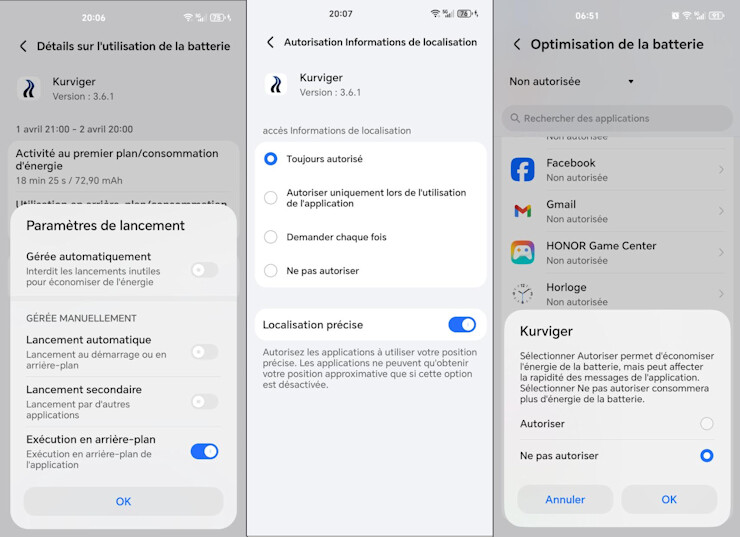
Please check if A) you have enabled the location in the background permission, we can only provide voice instructions in the background if we know the location and B) if you remove battery optimization / stop app in background. See also Why is the Kurviger App stopped / killed or why is the GPS signal lost in Background [Kurviger Knowledgebase] and https://dontkillmyapp.com/ for more info on this.

Yes all this is fine. before write all this, I read the different post about this issue and the different advice that your gave. So yes, this is ok.

You could try with simulation mode. You could try without headset (in a car for example).

If this does not help, maybe you can provide some more information. It’s hard to guess without more information.

I Have this issue in simulation mode also (See video)

Aside from the device we’re on the same OS and app version.
I’m on a Samsung A35 connected to a Cardo Freecom 4x (via Bluetooth).

I always run Kurviger and Spotify at the same time, and I start Kurviger first including starting my route before turning on Spotify. These little details are sometimes important

I have had the same issue you describe albeit to a much lesser extend. Didnøt happen today during a 4 hour trip, but happened twice yesterday on a 1 hour trip.
Last season it also happened for me when using Detecht.

It could be a bug with navigation apps in general, where they turn down all audio, or it could something related to this: Google Confirms Android Volume Bug Tied To Accessibility

The fix for me is to turn up the volume. Even a tiny notch or a single press is enough to get full audio back. Could you test if this is also the case for you?
Perhaps also test using a BT device.

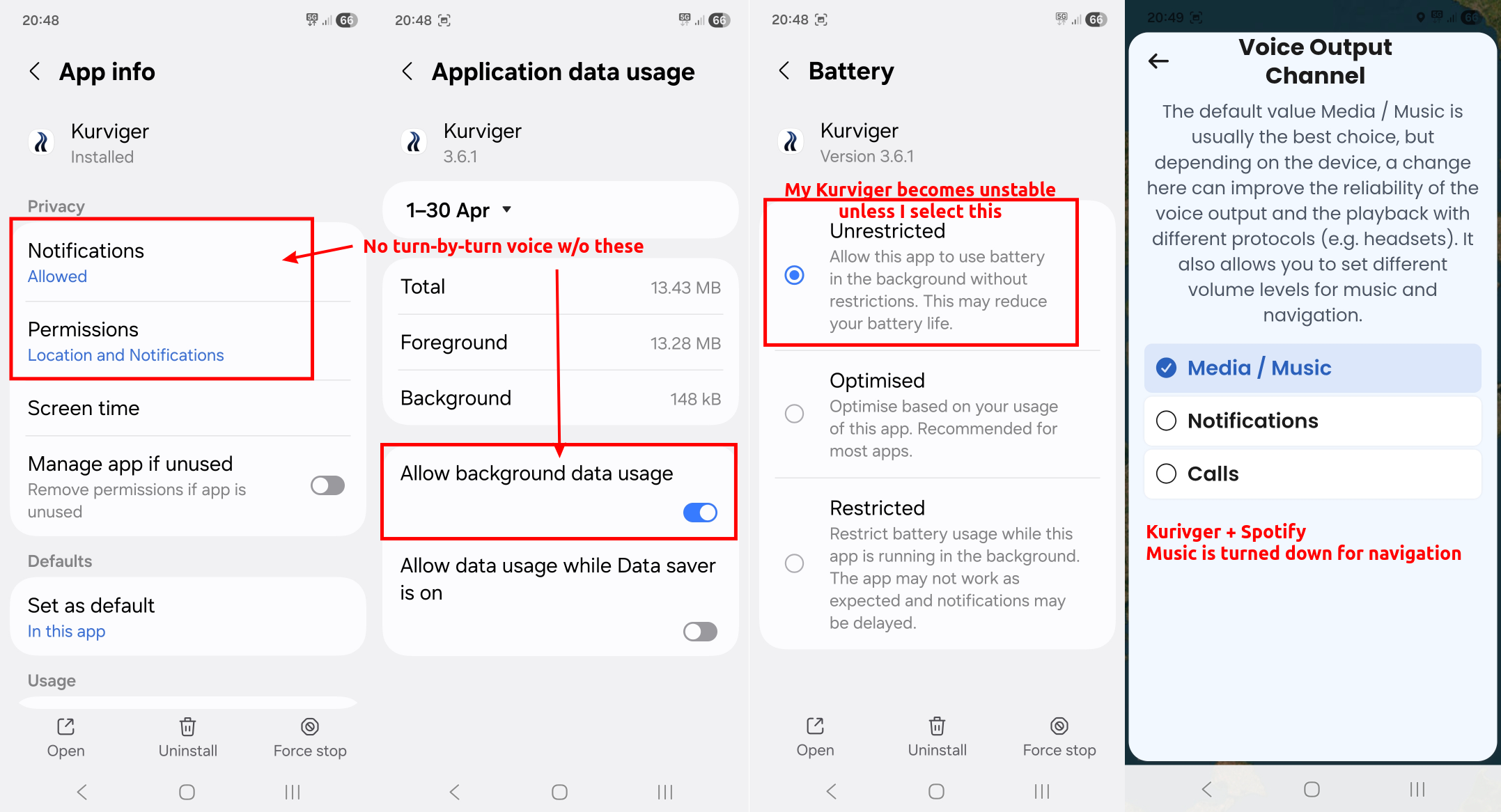
And also double-check your app settings in Android (see attached image). When people say they have done everything as described, in my experience that is not always the case.

I’m not saying you have done anything wrong, I’m merely trying to eliminate any human errors (we are forgetful creatures). :slightly_smiling_face:

-

AI assisted translation:

Je fais toujours tourner Kurviger et Spotify en même temps, et je lance Kurviger en premier, y compris le démarrage de mon itinéraire avant d’allumer Spotify. Ces petits détails sont parfois importants.

J’ai eu le même problème que celui que tu décris, bien que dans une moindre mesure. Cela ne s’est pas produit aujourd’hui pendant un trajet de 4 heures, mais c’est arrivé deux fois hier lors d’un trajet d’1 heure. La saison dernière, cela m’est aussi arrivé en utilisant Detecht.

Il pourrait s’agir d’un bug général des applications de navigation, qui baissent le volume de tous les sons, ou d’un problème lié à ceci: Google Confirms Android Volume Bug Tied To Accessibility

La solution pour moi est d’augmenter le volume. Même un tout petit cran ou une seule pression suffit pour retrouver le son à plein volume. Pourrais-tu tester si c’est aussi le cas pour toi ? Essaie aussi avec un appareil Bluetooth, si possible.

Et vérifie également les paramètres de tes applications sous Android (voir l’image jointe). Quand les gens disent avoir tout fait comme décrit, dans mon expérience, ce n’est pas toujours le cas.

Je ne dis pas que tu as fait quelque chose de mal, je cherche simplement à éliminer toute erreur humaine (nous sommes des êtres oublieux).
1 Like

Thanks Notnuts for your answer, and don’t worry**,** I’m a developer myself and I know that when someone reports a issue, you should always check what’s been done :o) we can all forget something, including myself.

Seems those parameters are set.

If I don’t listen music in same time, the issue is exaclty the same. After few minutes, the voice disappears.

If I use cardo or not → same issue.

Simulation or not → same issue.

Play with the volume have no effect. Still no voice. The only way to have the voice back is to close and restart the application. (and I will have voice again only for few minutes)

In my opinion, if the issue was link to the “Android volume bug”, all the other GPS applications should have the same issue. But maps, waze or other are working well.

Sure the problem is link to a property somewhere in my phone. But not only, the application is also involve because other applications don’t have this issue.

I know that it’s not something easy to find and I can’t see what I can provide to help you to identify the rooth cause but if you have an idea…

1 Like

Looks like you have everything set up correctly. The only thing I can think of is some weird incompatibilty bug in Kurviger with your specific phone.

You could try on another phone, but that kind of defeats the purpose of an app, if you have to get a different phone. Have you tested detecht?
It’s not as feature rich as Kurviger, but their free plan has voice navigation, and that sometimes bugged out for me as well

I could solve a sound issue on a friend’s smartphone, by uninstalling Text-To-Speech languages, then download again. This was an issue of very low speech volume mixed with no speech, but just a short click-sound instead of speech. Not very likely in your case, but a 5 minute job.


Edit

Found an older thread:


Today I wanted to test how my second mobile phone (which I normally never use for navigation) behaves when the screen is off.

However, I didn’t have any voice output on this phone at all. When I started it up, I heard the “ping”, but not “Let’s go”.

Here’s what worked for me:
I uninstalled Google Speech and Voice Recognition (the update from late June) and reinstalled the updates. I deleted the voice files and downloaded them again. And it worked straight away.

Thanks all for your advices. I will test what you propose and continue to dig. If I find something positive,I will let you know.

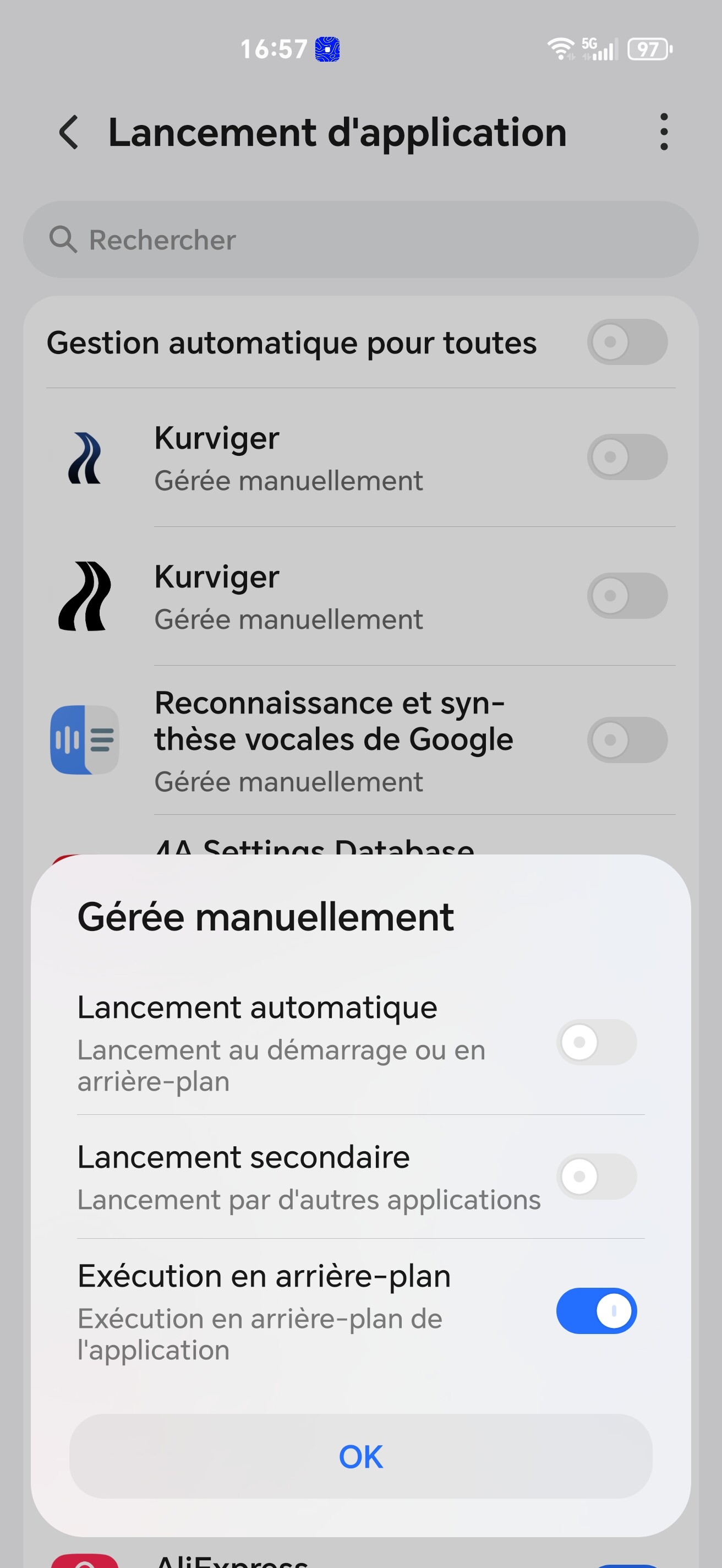
I found!

for the Google vocal engine, I need also to put the background execution settings

and with this. all is working!

could be useful for other people.

Thanks for your help.

5 Likes

Awesome :partying_face: … and kudos for sharing your solution for others to discover