I’m trying to pay in the browser on my computer, but am told that “We are unable to take payment at this time. Please try again, or use a different payment method.”
I have tried several credit cards (both Visa and Mastercard), but same problem.
I can’t pay using Google Play Store (because I use GrapheneOS without any Google services), and I won’t ever use Paypal …
Nope. Tried several different phone and several different computers. Also tried several different cards.
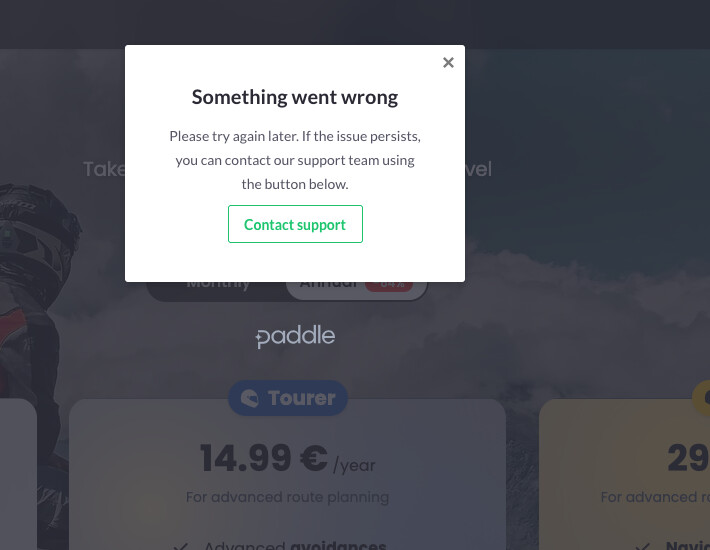
Now, when I click “Try 7 days for free”, I immediately get the error:
Something went wrong
Please try again later. If the issue persists, you can contact our support team using the button below.
I’d like to give you my money, but doesn’t look like you can take it (unless it’s through Google Play Store - which is never going to happen, because I un-Googled myself for more than 10 years ago …
… and PayPal is also on my shit-list.
Let me know how I can pay you, and I’ll get the money to you instantly - including via Monero, Bitcoin or Lightning).
Had a closer look, and can see that it IS related to the Paddle integration.
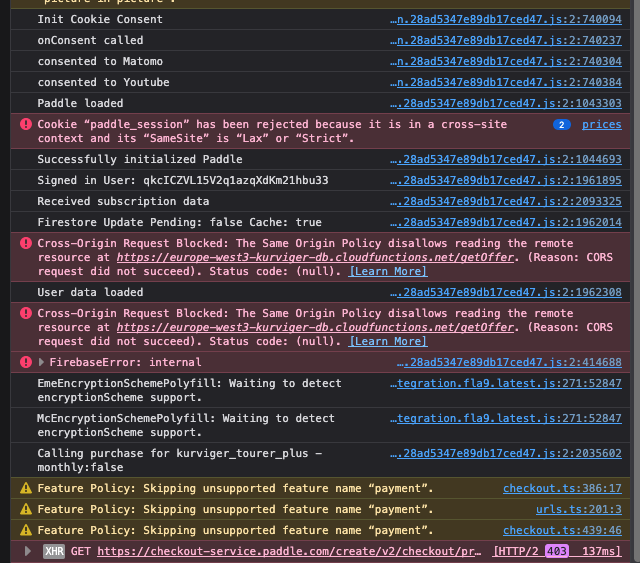
Some details from my browser session - which clearly says it’s because the integration is done in an insecure way: Cross-Origin Resource Sharing (CORS).
None of my browser on any of my devices will allow this - and neither should you or Paddle allow this:
Init Cookie Consent [main.28ad5347e89db17ced47.js:2:740094](https://kurviger.com/main.28ad5347e89db17ced47.js)

onConsent called [main.28ad5347e89db17ced47.js:2:740237](https://kurviger.com/main.28ad5347e89db17ced47.js)

consented to Matomo [main.28ad5347e89db17ced47.js:2:740304](https://kurviger.com/main.28ad5347e89db17ced47.js)

consented to Youtube [main.28ad5347e89db17ced47.js:2:740384](https://kurviger.com/main.28ad5347e89db17ced47.js)

Paddle loaded [main.28ad5347e89db17ced47.js:2:1043303](https://kurviger.com/main.28ad5347e89db17ced47.js)

Cookie “paddle_session” has been rejected because it is in a cross-site context and its “SameSite” is “Lax” or “Strict”. 2 [prices](https://checkout.paddle.com/api/2.0/prices?product_ids=836635,836636,836637,836638&callback=myCallback&callback=jsonp_1753385737472_21774)

Successfully initialized Paddle [main.28ad5347e89db17ced47.js:2:1044693](https://kurviger.com/main.28ad5347e89db17ced47.js)

Signed in User: qkcICZVL15V2q1azqXdKm21hbu33 [main.28ad5347e89db17ced47.js:2:1961895](https://kurviger.com/main.28ad5347e89db17ced47.js)

Received subscription data [main.28ad5347e89db17ced47.js:2:2093325](https://kurviger.com/main.28ad5347e89db17ced47.js)

Firestore Update Pending: false Cache: true [main.28ad5347e89db17ced47.js:2:1962014](https://kurviger.com/main.28ad5347e89db17ced47.js)

Cross-Origin Request Blocked: The Same Origin Policy disallows reading the remote resource at https://europe-west3-kurviger-db.cloudfunctions.net/getOffer. (Reason: CORS request did not succeed). Status code: (null).

User data loaded [main.28ad5347e89db17ced47.js:2:1962308](https://kurviger.com/main.28ad5347e89db17ced47.js)

Cross-Origin Request Blocked: The Same Origin Policy disallows reading the remote resource at https://europe-west3-kurviger-db.cloudfunctions.net/getOffer. (Reason: CORS request did not succeed). Status code: (null).

FirebaseError: internal [main.28ad5347e89db17ced47.js:2:414688](https://kurviger.com/main.28ad5347e89db17ced47.js)

EmeEncryptionSchemePolyfill: Waiting to detect encryptionScheme support. [sdk-iframe-integration.fla9.latest.js:271:52847](https://customer-52r7qn91j579xxh3.cloudflarestream.com/embed/sdk-iframe-integration.fla9.latest.js?video=36d58023516f7ca3ea9d46f9b80c4a36)

McEncryptionSchemePolyfill: Waiting to detect encryptionScheme support. [sdk-iframe-integration.fla9.latest.js:271:52847](https://customer-52r7qn91j579xxh3.cloudflarestream.com/embed/sdk-iframe-integration.fla9.latest.js?video=36d58023516f7ca3ea9d46f9b80c4a36)

Calling purchase for kurviger_tourer_plus - monthly:false [main.28ad5347e89db17ced47.js:2:2035602](https://kurviger.com/main.28ad5347e89db17ced47.js)

Feature Policy: Skipping unsupported feature name “payment”. [checkout.ts:386:17](webpack://paddle-js/src/utils/checkout.ts)

Feature Policy: Skipping unsupported feature name “payment”. [urls.ts:201:3](webpack://paddle-js/src/utils/urls.ts)

Feature Policy: Skipping unsupported feature name “payment”. [checkout.ts:439:46](webpack://paddle-js/src/utils/checkout.ts)

XHRGET[https://checkout-service.paddle.com/create/v2/checkout/product/836638/?product=836638&parentURL=https://kurviger.com/en/premium&parent_url=https://kurviger.com/en/premium&referring_domain=kurviger.com&guest_email=kurviger.3lz1j@aleeas.com&title=Kurviger Tourer Plus Yearly Subscription&passthrough={"uid":"qkcICZVL15V2q1azqXdKm21hbu33","wl":""}&display_mode=overlay&apple_pay_enabled=false&paddlejs-version=1.2.2&vendor=121216&checkout_initiated=1753385759942&popup=true&paddle_js=true&is_popup=true&locale=en](https://checkout-service.paddle.com/create/v2/checkout/product/836638/?product=836638&parentURL=https%3A%2F%2Fkurviger.com%2Fen%2Fpremium&parent_url=https%3A%2F%2Fkurviger.com%2Fen%2Fpremium&referring_domain=kurviger.com&guest_email=kurviger.3lz1j%40aleeas.com&title=Kurviger%20Tourer%20Plus%20Yearly%20Subscription&passthrough=%7B%22uid%22%3A%22qkcICZVL15V2q1azqXdKm21hbu33%22%2C%22wl%22%3A%22%22%7D&display_mode=overlay&apple_pay_enabled=false&paddlejs-version=1.2.2&vendor=121216&checkout_initiated=1753385759942&popup=true&paddle_js=true&is_popup=true&locale=en)[HTTP/2 403 137ms]
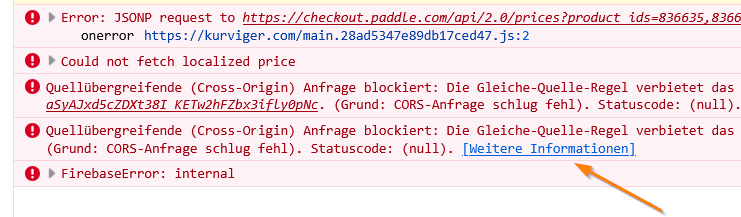
I am also quite critical about data protection and have on my devices or here in Firefox an adblocker and also a script blocker. The script blocker works “quite fine”, means I have to allow all necessary connections one by one.
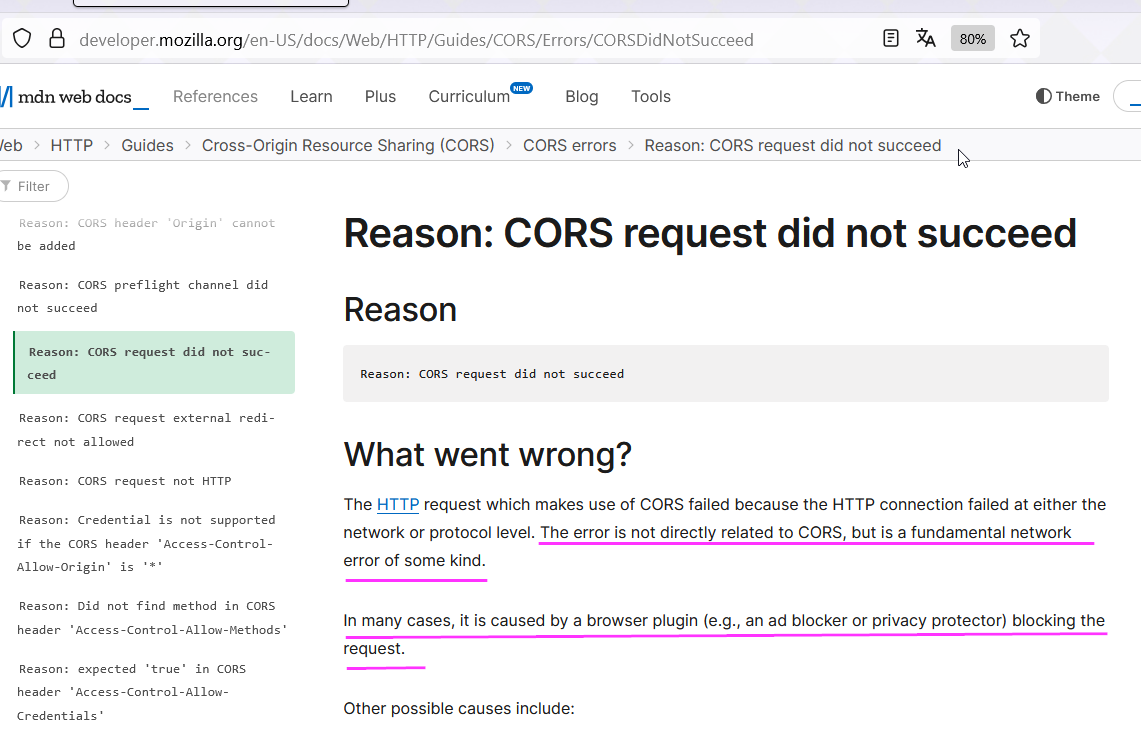
Please check again your blockers, there are quite a lot of partners involved. Allow it one by one or switch off temporarily and the CORS issues are away.
Please double check your settings, I guess you don’t allow any cookies / storage of local data? When you enable this setting, browsers will warn you, that websites might not work correctly. Alternatively, it is an issue with browser plugins, see also: Kurviger behaves differently than expected – what can I do? [Kurviger Knowledgebase]
Tried again from my Mac. Same problem. As soon as I click any of the premium links, I get the error described above.
Tried the diagnostics page and deleted the cache.
Same problem.
Tried a different browser on my GrapheneOS. Same problem. Tried the diagnostics page and deleted the cache. Same problem.
Created a new account at Kurviger. This time I did not get the error described above, and then I got to the payment page - but no matter which card I use, I get the We are unable to take payment at this time. Please try again, or use a different payment method.
That sounds like a “you” problem: “We are unable to take payment at this time”.
I never have experienced anything like this. I normally can get around these kind of problems, but in this case, I am stuck - and I am ready to give up being a paying customer of Kurviger even before I get a chance to try out to product
I also read a little bit about GrapheneOS. I guess you are using VPN?
Once, my bank / credit card informed me about a payment request from another country, they wanted to have approval, as this was against my normal “pattern”. Since then I informed my bank when I am abroad. Possible issue could be that your bank wants to protect you from fraud. You may contact your bank to clarify, or decativate VPN temporaily, if so.
Thanks for responding again.
It’s definitely not a problem in my end. I have tried this from a number of different phones and computers, and I have tried with both physical and virtual credit cards and debit cards from several different banks in several different EU countries …
Yes, I use a VPN most of the time, and yes I am strict on security using several layers of dedicated locked-down systems - but that has never stopped me from paying before.
I know how to navigate the world I have chosen to live in, but this is beyond me
As far as I can see, it’s the middle-men (your payment provider and my banks) who are causing these problems).
Life is too short for that, which is why I asked for an alternative payment method (Bitcoin, Lightning, Monero) without middle-men to “protect” me, censor me, and cause delays - while they charge hefty fees for their “services”.
I can’t (won’t) strip down all my defenses for anyone or anything - especially not when I am buying something from a vendor I don’t yet know or trust.
So, unless there is an alternative way for me to try out Kurviger, I just have to drop the matter and move on with my life …
Thanks again. I do appreciate you for taking the time to assist me.
That’s the old banks. The neo-banks are used to their customers being from other countries, travelling and using VPNs. I have had zero problems with geo-blocking or cancellations with the neo-banks that I use for several years.
I think it’s the mix of Cloudflare, Paddle and all the other intermediaries that Kurviger use.
I get the same two errors no matter where I am, what device I use, if VPN is on or off, if add-blocker is on or off.
I have just now tried one more time using a friends computer and Visa card: Same problem. I submit the card details, and immediately I am told that ““We are unable to take payment at this time””.
My friend is a normie, i.e. no clue about computer security, so no add-blocker, no VPN, no weird browser plug-ins, …
It is like the two account I have created at Kurviger.com are causing everything to go wrong …
We will ask Paddle to double check if there was an issue with your card. I have sent you a PM about this.
That said, we unfortunately can only sell our software using either Paddle, Google Play, or Apple using the payment methods supported by them. Sorry, we can’t accept any direct payment.
We are unable to take payment at this time. Please try again, or use a different payment method.
I’ve tried different browsers on both mobile and desktop, and I’ve disabled all plugins. I also checked with my bank, and they haven’t received any payment request for my credit card, so it seems like the issue might be on Paddle’s side. Were you able to find a solution?
Please make sure your browser supports cookies / local storage and try again at least 24 hours after your last attempt. At least the last time, the reason was a security measure was triggered. Paddle will ban these users for some time to avoid scams. This does not mean you did anything wrong. The next time you try, please double check you allow local storage and ideally disable browser plugins, especially some of the more aggressive ones. If it does not work the next time, please send me a DM here in the forum with the email you used at Paddle and will double check with Paddle.