Not offered function in current Kurviger !
However, it is already possible. (PM me)
What are SP and VP and what do they do?
An SP or VP promotes an associated track point. That’s all.
You can assign or remove promotions. This can be done with noise (recalculate) or silently (without recalculating). Creating an extra track point at a promotion, anyway triggers a calculation. If you promote an existing track point, it can be done discreetly and silently without calculation.If you later remove promotions silently, existing trktp can remain intact without calculation.
Users anyway do expect a recalculation when removing a single SP promotion.
The delete ALL SP tool, removes all SP promotions silently without recalculation.
There is no delete ALL VP tool. As VPs are mostly more important and therefore extra protected. First convert to SP, which allows to remove them in the same silent way.
Advantage.
Sometimes a design with many SPs is visually cluttered. The tool allows you to remove the SP without triggering a recalculation. You can then simply continue with a clean slate.
I hope this is clear? If so, we can discuss next.
It is well known that there are no intermediate destinations in a track.
The osmAnd gpx waypoint marker mode is fine for simple straight routes.
But the gpx marker waypoint is NOT strictly linked to a specific gpx track point.
In complex tracks, the via point can so falsely be announced multiple times.
In a .kurviger file, a via wpt is strictly associated with the track point.
The via point is therefore announced at the correct location.
In a gpx navtrk, the indication is placed IN the track point.
The ensures a single announcement at the correct location.
Dass der Via-WPT in Kurviger nicht strikt mit dem GPX-Trackpunkt in
OsmAnd verbunden ist wird twk1 bekannt sein.
Um twk1 zu überzeugen beim Kurviger Web Planer zu bleiben wäre eine Anleitung
wie man einen Track ohne SP nur mit Zwischenzielen exportiert für ihn besser.
I am only presenting my findings by the previous test. Delete all shaping points function. Whether Kurviger web wishes to offer this or not is not up to me. However, I suppose it would be appropriate and useful to discuss this briefly with the Cruiser dev who wrote the .kurviger file format, if I am correctly informed. Good luck.
I read it differently. Wrong ? @Biker wants to delete all SP in the track. @twk1 wants extra such as (poi) wpt ? This is very common in gpx files. But is not provided in a .kurviger file (yet). The more important file system for Kurviger than gpx is. Have I misunderstood twk1 regarding the extra wpt feature? So to test find a gpx navtrk inclusive extra (poi) wpt. Observe the results in:
Locus - With accurate navigation, the wpt’s shown with Garmin icons.
Cruiser.- With accurate navigation, the wpt’s shown with cyan dot.
OsmAnd display ? OsmAnd users do test ?
Is support requested for such separate (poi) wpt or not? Cape_Cod_wpt_leg1_leg2_loop_option_navtrk.gpx (1.0 MB)
Hallo, ich habe einige Fragen.
2.) Wie exportiere ich eine Route ohne Shaping-Punkte, aber mit den selbst erstellten Wegpunkten und ihren korrekten Namen?
3.) Ich benötige eine GPX-Datei, die ich in OSMAN verwenden möchte. Wie gehe ich dabei vor?
Da Kurviger das nicht kann und andere Lösungen zu umständlich sind benützt er weiterhin Alltrails.
@twk1. Conversations can sometimes be difficult.
Consistently using the gpx standard terminology would be clearer.
According to the standard gpx waypoints are independent of both gpx routes and gpx tracks.
If gpx wpt’s are used for the calculation, they are so promoted to route(way)points.
What Kurviger calls Waypoints are in the spirit of the gpx standard routepoints. (via_shaping)
@twk1.
A delete all shaping points tool is NOT offered in Kurviger.
This is only been discussed now but NOT officially requested (yet).
Attaching separate wpt’s that accompany the track is NOT offered.
This is only been discussed now but NOT officially requested (yet)
The ones (not me) who need both features should officially aks for it.
This is how I do it: While in the “Plan” mode, put your cursor on the new spot on the map and zoom in, then [Right+Click] and select “Set as via point” to add it to your Route. The new waypoint will automatically be named as coordinates, so [Click] on it to give it your desired name.
I understand what you are looking for. The only option currently in Kurviger is to export using GPX advanced with Export waypoints option on. Then, after importing the GPX file into OsmAnd, I’ve found a very simple and quick way to delete ONLY the shaping points. When I open the GPX file in OsmAnd, it groups the points, so all the Shaping Points are in one group. I delete the whole shaping point group by tapping on the 3 dots in the screenshot below and then tapping “Delete”. This is not ideal, but I have found it to be a very quick and easy solution for removing the Shaping Points.
For me, Kurviger is worth it for the route planning alone. I have not found any other app with an algorithm that is nearly as good as Kurviger for planning great routes. Over time, everyone finds the best set of tools to fit their preferences, and it is rare that I know two people who prefer to use all the same tools. There are many variables, and it seem it is nearly impossible for one app to provide every person with everything they need. Over the years my favorites have become Kurviger for planning, OsmAnd+ for track following in the field, and sometimes Basecamp if I need more advanced GPX file editing.
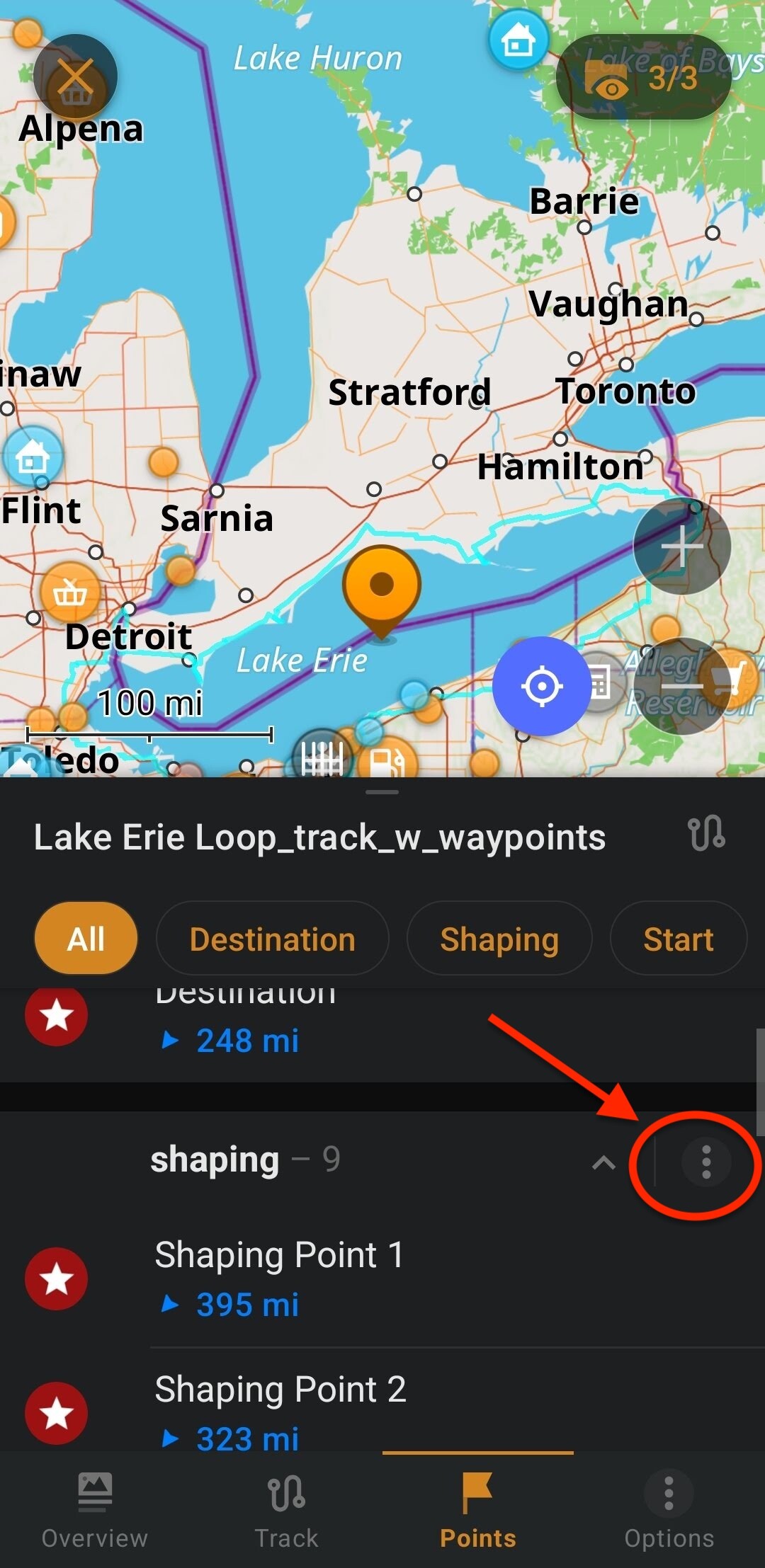
 Aktuell die Beste Möglichkeit.