Since the latest update 3.6.0 the kurviger app is not responding to input from my adventure controller (carpe iter). The only thing that works is map panning. Zoom in or out or center does not work anymore. Is there a fix for this?
Thanks for letting us know. They should be using the correct keys. The regular key presses of (+) or (-) do still work and remain unchanged in our app. Is there maybe an update for your Carpe Iter device?
If you have the latest update and set up the Carpe Iter device to use regular button presses, then we would need more information. Maybe also contact the Carpe Iter support about this.
Edit: I also asked Carpe Iter to verify what might be happening here.
I forgot to mention i am using it on a Thork dmd 2 tablet. But when i use it outside dmd2, using the standard launcher, it still does not work.
I received feedback from Carpe Iter:
We have tested Kurviger and it works as it should. It is possible that they still have the Accessibility service enabled for the Controller app (along with NGH), or they are using a keymapper. It is also possible that a required setting is disabled.
Here are two support pages from Carpe Iter, please double check these as well:
I checked everything that is mentioned but no result. The buttons are working fine when I check the function in CarpeIter controller app. I have a Thork t865x. This comes standard with gboard keyboard and was never a problem. I also checked the automatic profiling. This was the setting I used and gave problems with kurviger. When I turn this off and use the settings for TomTom Go all the buttons work. The setting specific for Kurviger doesnt work! I think that CarpeIter did not configure the settings in automatic profiling to work with the new Kurviger software. Unfortunately using the TomTom Go setting instead of the automatic one gives all kinds of unwanted results in other apps. I also checked it on my google pixel phone completely oustside the dmd2 environment. The results were exactly the same. So I think i have to consider a different controller. For example the new Silverfox C2. I know that it is expensive but what is the use of a controller that doesnt work?
Why would you buy a new expensive controller, due to a configuration problem?
What did Carpe Iter answer to your problem description? If you suspect they did not configure something properly, just ask them to do so. You are likely not the only person with this problem, so CI should respond.
Kurviger has already contacted CarpeIter and their statement was that they tested it and it works fine. And it seems like a small problem on paper but with the result that the functionality is just not there. And that is what it is all about.
I would definitely recommend to get in touch with Carpe Iter first, before buying another controller. That said, as far as I know, Silverfox works as well with Kurviger (but Carpe Iter should as well).
If you have a Bluetooth Keyboard you can connect that to your phone and try pressing the +/-/ENTER buttons to see the zoom. The controllers are essentially just a bluetooth keyboard.
Also make sure that this only works during the navigation!
Yes, but it does not work for you, so if you get in contact with CI, you can describe your setup and they might be able to reproduce the problem and solve it.
Today, after the winter break, I wanted to use Kurviger with BMW control from Carpe Iter, but unfortunately I found that the application does not respond to zoom, for example. The controls work in other apps, so the problem is probably with Kurviger and likely appeared after one of the recent updates (everything was working fine at the beginning of December). Can any of the developers confirm this or advise on how to revert it? Thanks.
Edit: Sorry, I didn’t know this topic already existed. Thanks for moving it to the right thread.
I encountered the same issue with CarpeIter adventure controller. Both Kurviger and CarpeIter state that they didn’t change anything and everything should work fine. No solution yet.
@Pdj1967 and @Jaromir_Chochola, I am sorry to hear that you are facing issues. Our current key mapping is documented here: Remote Control Support [Kurviger Knowledgebase]
Please make sure that your remote controls send these buttons. We did a recent change for the arrow keys, these now pan the map with version 3.6.1. That said, this should not change the Carpe Iter support.
I don’t have a Carpe Iter device to verify the integration, we have provided Carpe Iter access to our app, so they should be able to test the implementation. I can only refer you to the Carpe Iter support.
Thanks for the reply. My adventure controller broke down. I replaced it with a Silverfox C2 controller. @Jaromir_Chochola good luck with solving this issue.
Ich habe das gleiche Problem mit dem CarpeIter Adventure Controller..
Google Maps funktioniert.
Leicht offtopic?
Ich habe das große Glück eine Fersteuerung zu haben, welche ich selbst konfigurieren kann, heißt ich kann selbst definieren, welche Tasten ich sende. Mir scheint, das ist bei diesen Fernsteuerungen nicht der Fall oder / und technisch schwieriger ist. Weil ich aber auch den Wunsch habe, Android-Funktionen per Fersteuerung auszulösen (Screenshot, Musik, Apps aufrufen ..) verwende ich die App “Button Mapper”.
Wenn jemand ein bisschen frickeln und berichten möchte, ob das mit den vorhandenen Fernsteuerungen möglich ist, dann gerne.
Grundsätzlich fände ich sowas direkt in Kurviger hilfreich, um nicht von Herstellern abhängig zu sein.
Playstore - Link
Läuft bei mir immer mit, keine Akkuproblemchen, ist bei mir ganzjährig aktiv.
Link zur Homepage des Entwicklers.
Mir ist keine ähnliche App für ios bekannt.
Hier ein paar Screenshots, Rest ist Probieren.
Nach der Installation Dienst aktivieren, Berechtigungen erteilen.
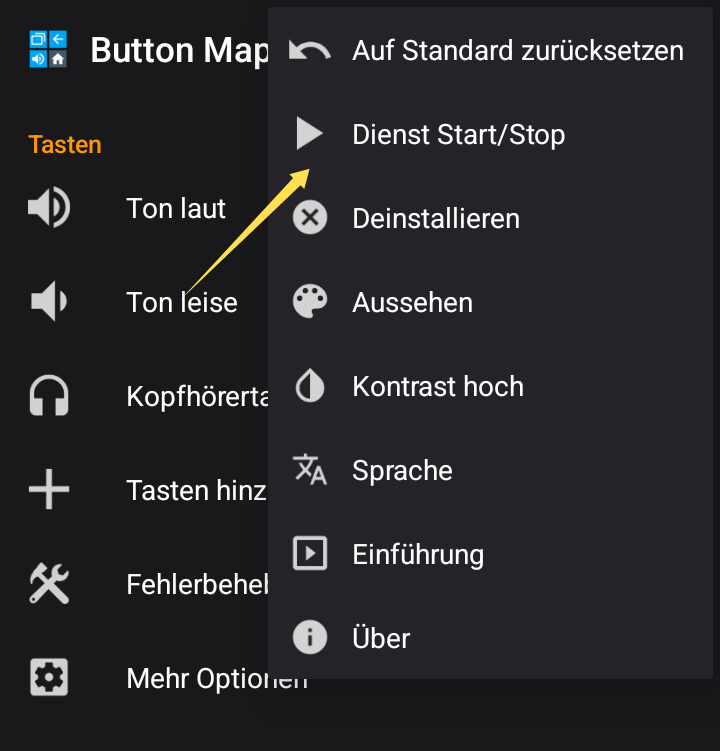
Taste einer Ferbedienung hinzufügen …
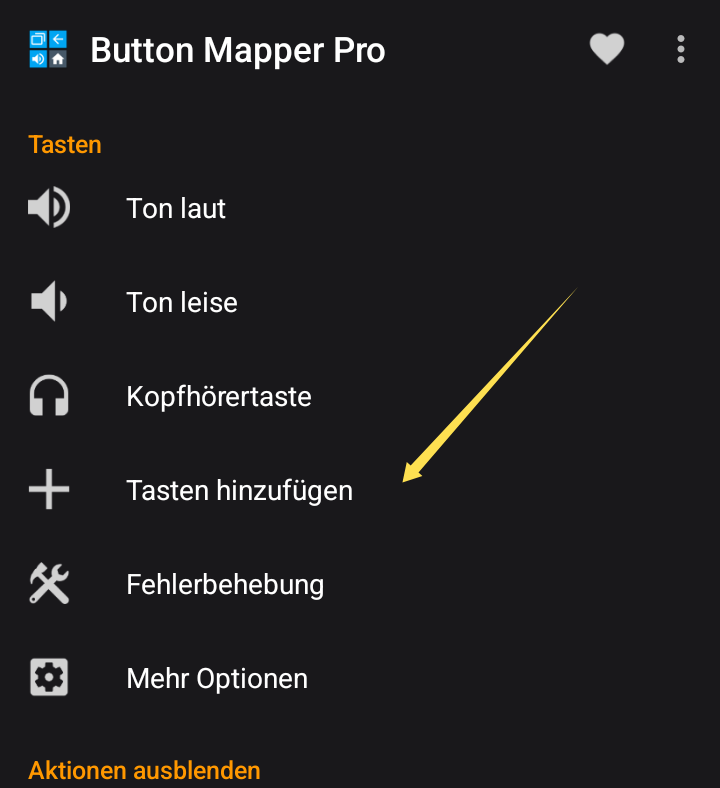
.. und Plus-Button tippen.
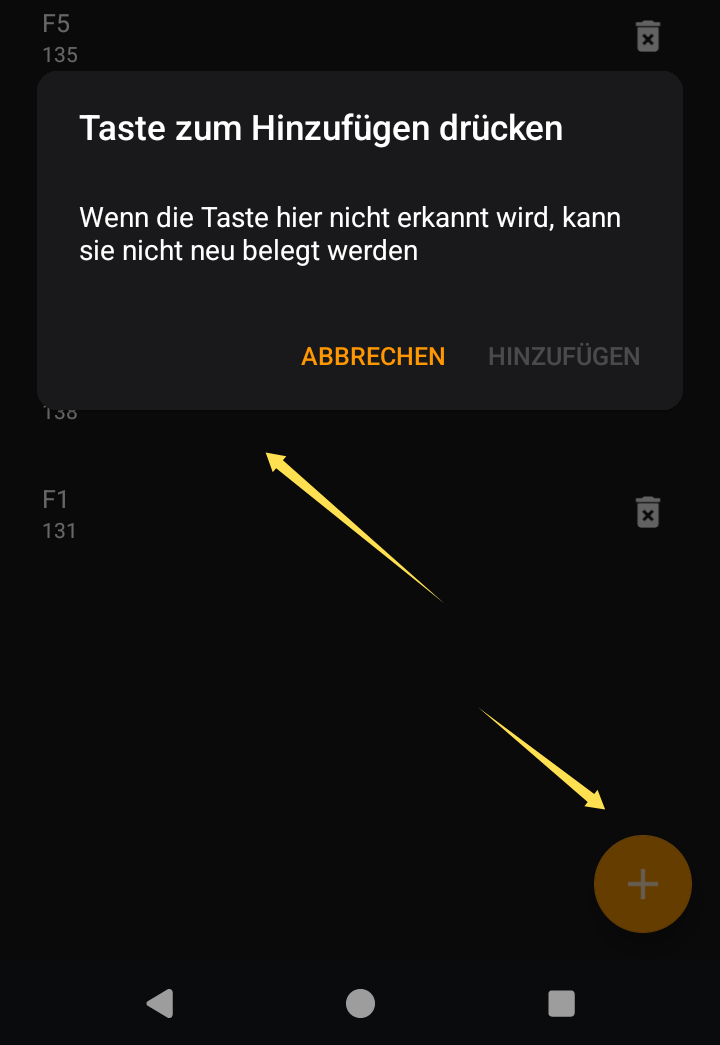
Wenn Dialog offen ist, die Taste auf der Fernbedienung drücken und bestätigen.
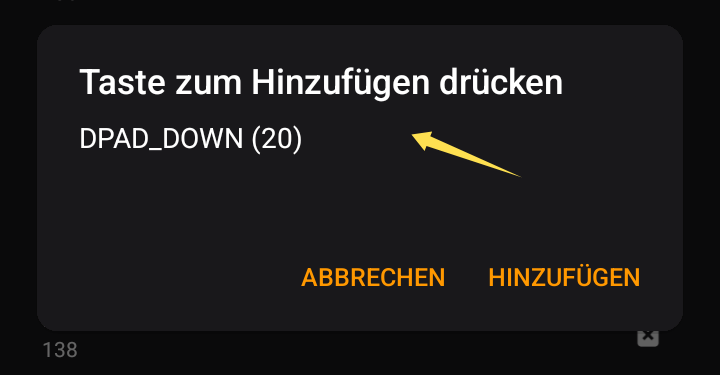
Jetzt aus dem Füllhorn an Möglichkeiten eine Aktion wählen (Screenshot zeigt nur einen winzigen Teil).
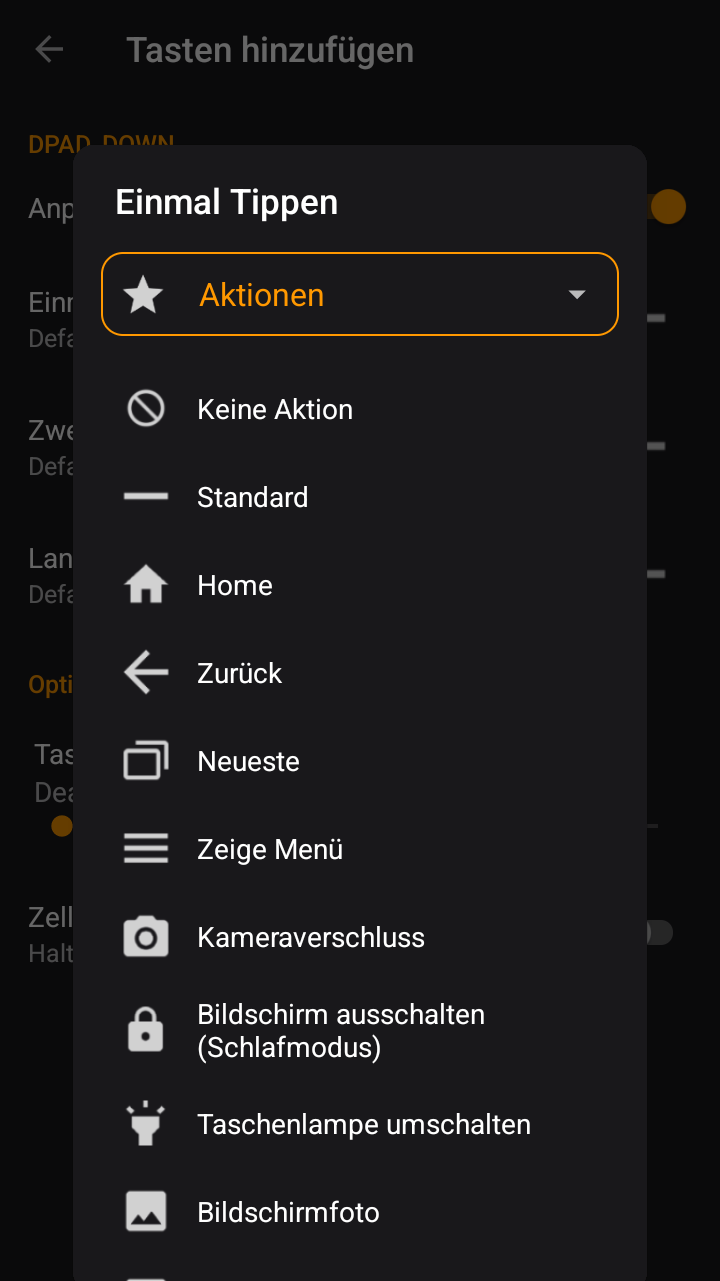
Eine Taste nicht auf eine Aktion, sondern auf eine andere Taste zu mappen kann etwas kniffliger sein, zum Beispiel eine Taste auf “+” zu mappen. Dafür braucht es eine Berechtigung, welche mit ADB aktiviert werden muss. Keycode 43 wäre “+” und 45 wäre “-”. Wäre ja nicht so sicher, wenn jede App von sich aus irgendwas tippen könnte ..
Nach dem zurücksetzen auf Version 3.5.10 funktioniert der Controller wieder .
Dateien zum Downgrade gibts hier
[LINK ENTFERNT]
Die Anleitung zum Installieren gibt es auch auf der Seite
Wenn der Controller nach einem Software-Downgrade von Version 3.6.0 auf 3.5.10
wieder funktioniert sollte das Problemen an der Version 3.6.0 liegen.
In der Tat liegt es an der 3.6-Version.
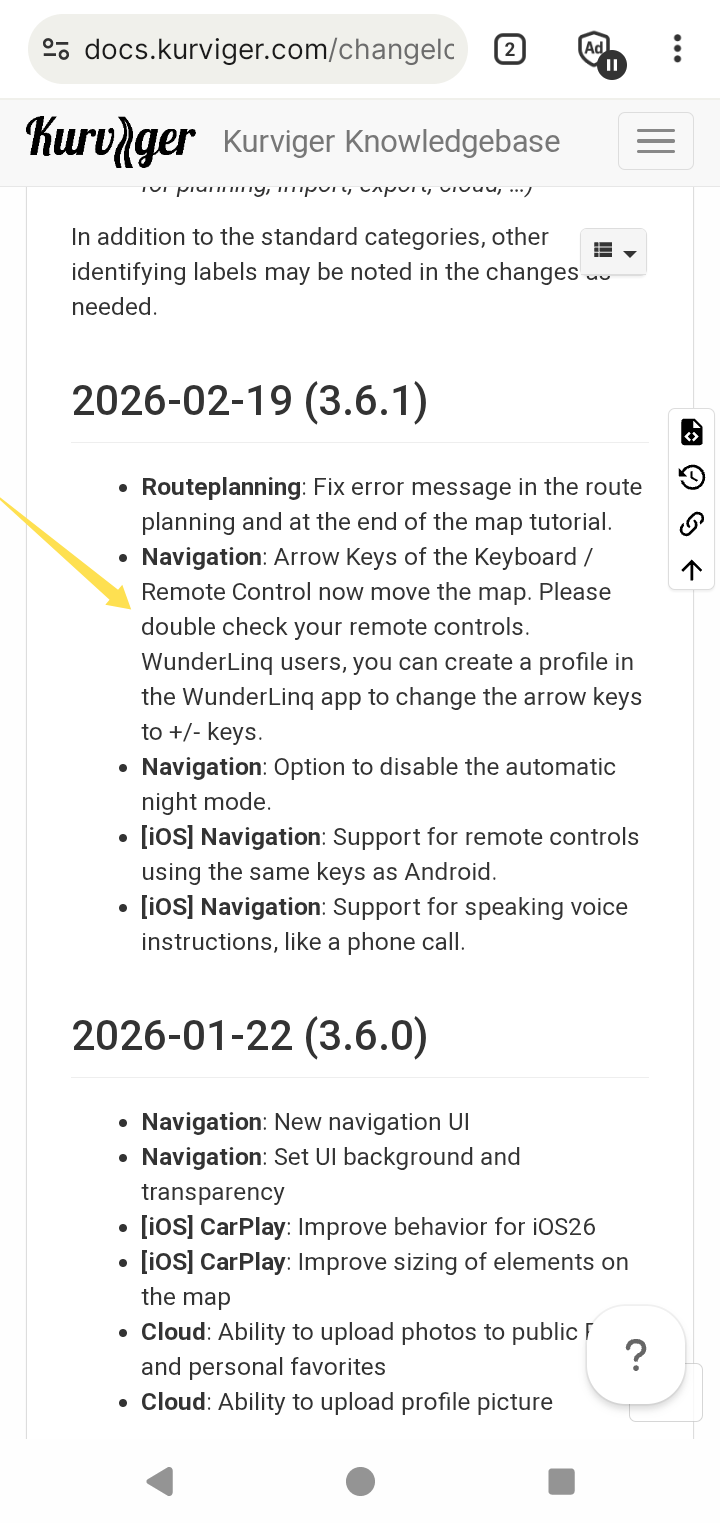
Siehe Changelog. Geplante Änderung.
Die 4 Pfeiltasten machen jetzt Karte nach oben, unten, rechts, links. Halte ich für hilfreich und schlüssig. Die Fernsteuerung muss wohl umkonfiguriert werden.
Oder wie ich oben angeregt habe, die Tasten selbst ummappen. Oder der Service des Fernsteuerungs-Herstellers. Oder Kurviger integriert ein Kurviger-Internes Mapping Funktion zu Taste.
Ein Downgrade über apk-Anbieter aus meiner Sicht nicht empfehlenswert, zumal die Änderung dokumentiert ist und wohl eher nicht mehr geändert wird.
Hallo zusammen,
Ich bin neu hier und hoffe aus der Runde eine Antwort auf meine Frage zu bekommen:
Zunächst mal was benutze ich mit Kurviger:
Ich fahre eine BMW mit Wonderwheel und habe ein Carpe Iter Pad. Darauf nutze ich Osmand, Google Maps, testhalber auch Locus maps und Waze, vor allem natürlich Kurviger. Alles funktionierte wunderbar bis zum Kurviger Update 3.6.1. Alles andere funktioniert auch weiterhin, nur Kurviger reagiert seither nicht mehr auf das BMW Wheel, also zoomen und zentrieren. Am rechten Lenkerende habe ich die Carpe Iter Fernbedienung mit 4 Buttons für das Verschieben der Karte, die funktionieren weiterhin.
Ich gehe davon aus, dass das Problem bei Kurviger liegt. Erstens wegen des zeitlichen Zusammenhangs mit dem Update, zweitens weil alle anderen Apps weiterhin funktionieren und drittens weil ich keinerlei Änderungen durchgeführt habe.
Ja genau, ich habe den Link auch entfernt. Ich möchte darauf hinweisen, dass diese APK Seiten eventuell nicht die originalen APKs zur Verfügung stellen. Wir haben mit diesen Seiten nichts am Hut, wir stellen unsere App für Android Geräte aktuell nur auf Google Play zur Verfügung.
Wir haben mit Version 3.6.1 Änderungen an den Tasten vorgenommen. Mit Version 3.6.0 nicht.
Ich schreibe Carpe Iter nochmal, dass die sich bitte nochmal die Integration anschauen sollen. Andere Controller funktionieren nach dem Update auf die 3.6.0 weiterhin. Es ist also nicht so, dass wir etwas grundsätzlich kaputt gemacht haben, sondern eher dass es irgendwo an der Schnittstelle Probleme gibt. Ich meine Carpe Iter hat relativ viel Logik in der Software für die Controller und haben auch eine App Erkennung, Profile etc. - eventuell reicht es auch die automatische Erkennung mal zu deaktivieren und auf reine Knöpfe zu setzen?