Hello,
Is there a method to bulk import existing GPX files, please? I’ve been using a different route planning system and would like to transfer my existing route to Kurviger.
Doing them one at a time would take a long time
Thanks Dave
Hello,
Is there a method to bulk import existing GPX files, please? I’ve been using a different route planning system and would like to transfer my existing route to Kurviger.
Doing them one at a time would take a long time
Thanks Dave
[EN]
As far as I know, this only works with overlays. So you can import a series of gpx files into an overlay folder in one go. This gives you an overview of all these routes, but not as a route to navigate. (Please correct me if I’m wrong).
I could imagine the following as a somewhat cumbersome solution: You combine your GPX files with another programme into a single GPX file, import it into kurviger and split it again with the split tool of Kurviger.
[DE]
Soviel ich weiß, geht das nur mit Overlays. Du kannst also eine Reihe von gpx-Dateien auf einen Rutsch in einen Overlay-Ordner importieren. So erhältst du eine Übersicht über alle diese Routen, aber nicht als als Route zum Navigieren. (Bitte korrigiert mich, falls ich daneben liege).
Als etwas umständliche Lösung könnte ich mir folgendes vorstellen: Du verbindest deine GPX-Dateien mit einem anderen Programm zu einer einzigen GPX-Datei, importierst diese in kurviger und teilst sie mit dem Teilen-Werkzeug von Kurviger wieder auf.
Thank you Max. That is where I got to, but wanted to check.
Perhaps an option for the future, as it would remove a possible block in the desire to change platforms.
Still worth it though 

Hi @Dave
we’ve actually considered this before, as this request has come up quite a few times.
Yet, we deliberately decided not to offer a direct (bulk) import for routes in this way because Kurviger doesn’t directly import the GPX track but generates its own routes based on waypoints. When transferring routes between different systems, deviations are unavoidable due to differences in map data, settings, and routing algorithms. We offer a good solution for that with our import, but as a bulk import it is not possible this way and would likely cause a lot of frustration.
However, as already mentioned, you can “bulk import” your tracks into Kurviger as Map Overlays (without any deviations at all) to see your Routes on the Kurviger Map.
Hi Kira,
could you elaborate?
I tried to import a bunch of routes as overlay, cause I was thinking it will be imported as 1 layer.
But I get the message “you have reached the limit of overlays”
So as I understand, the the bulk import function for overlays imports each track as single overlay
if it’s true, pretty useless bulk import, cause users are limited with 15 overlays.
Or am I doing something wrong?
No, you do nothing wrong. One Import uses one overlay. One of the 15, which is the limit.
@Kira said as already mentioned, so at least I understood, that you would have to use a gpx tool to combine all your gpx in one big file, as @Maxx18 suggested for the other workaround. Then one file = one overlay.
No bulk import is now available. We talked already in another thread. I made a suggestion, but it could not convince yet.
Some obvious questions. About how many gpx do we talk? Why do you want to have them all in Kurviger? Just to see the driven routes or also to have it as a planned route?
Dependant on that, here is surely somebody who has a script to put everything into one file (depends also on the gpx file creator and format) or a suitable tool from a gpx-website.
If we talk, let me say about 100 to 200 files, this would be one or two hours of work, not very nice, but the best and most reliable way. Good job for the upcoming time. 
thanks for the answer
To use as personal heatmap in kurviger. those are the tracks from before I started using Kurviger
I decided to use LLM to help me.
It produced under 100 lines of c# code, that converts gpx files into one kml file.
I had about 130 gpx files. the console app produced a 40MB big klm file. That was easily imported by Kurviger as one overlay.
10 min of “work” max:)
I just tried something, classic way 
On PC/Laptop.
Create a cloud route folder, rename to AAAAA, so it is on top of the list.
Open https://kurviger.com/de/plan?overlay=import and put in on the favorite bar. this will start the import manager.
Just press the import button, select once the source folder. Import and fix as required.
Save route, folder AAAAAA is given, just press save.
For next import press the favorite button, then work ahead.
200 gpx imported in one hour should be possible.
The most annoying thing on Kurviger’s import is, that kurviger recalculates the routes and there’s no way to import a track “as is”. and as in my case, when you want to have a historical data it’s not an option at all (eg the track goes on the road, which now is closed, so you can’t have this road in your imported track…)
so the overlay is kinda a workaround for that.
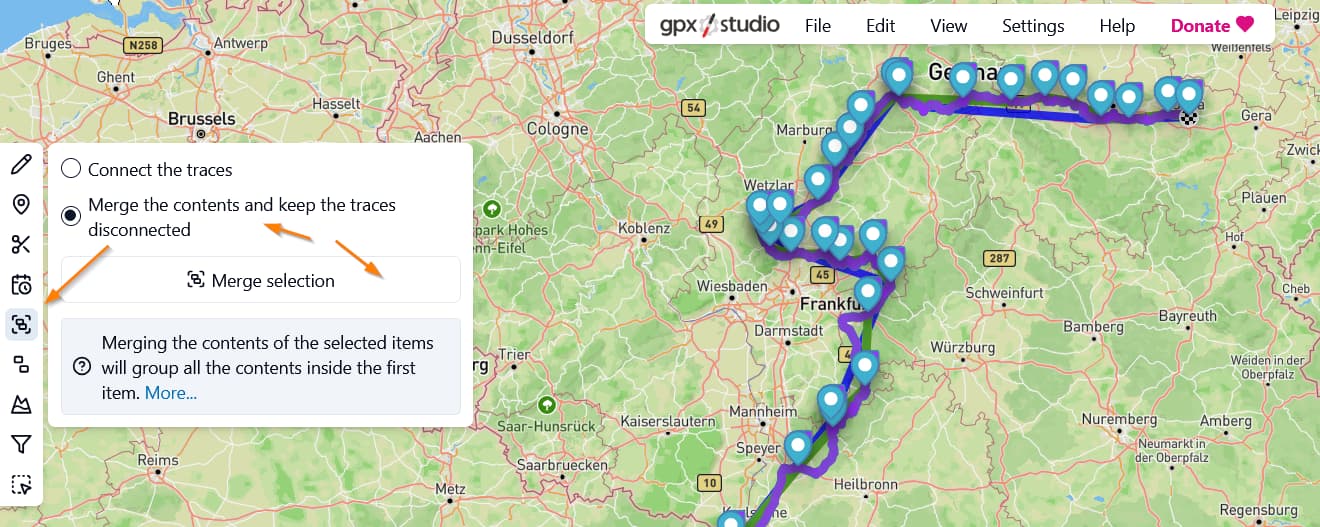
You can also try gpxstudio for merge.
Help: gpx.studio — help | Merge
Page/Webapp: gpx.studio — app
Then import as overlay in Kurviger. My little test worked fine.
@Kira if I remember correctly, importing tracks recorded with other apps/devices is also considered as a function that may be implemented in the future. Since for this use case, no complex conversions to the route and Waypoint optimizations are required, maybe the team could reconsider implementing bulk edit only for this type of import.
My two cents on this topic:
No, that’s correct. That’s why I put “bulk import” in quotation marks. If your tracks are all in individual files it wont work.
Yes. If you have one gpx with your tracks, you can import that as one overlay in Kurviger.
I understand that wish and we’ll have a look at this.
It is on the list but not top priority atm.
I completely agree with you. And that’s why we revised the import again - still working on it.
The overlays solution works for me just fine.
Personally for me, as mentioned previously, importing track(s) and loading Kurviger recorded tracks “as is” without recalculating would be much more helpful feature. Thanks:)