Today the weather was nice enough to take a ride and I decided to give Kurviger a test ride. These are my first impressions of using the navigator, Kurviger version 3.5.4, 8" tablet, horizontal and riding in offline mode.
I liked the map, it was clear and easy to read. The map screen is also open and free of clutter, very nice. The navigation instructions are clear. The POI icons do not show up well while riding. They did not appear to show up at all while driving, maybe I needed to adjust the zoom level? They could be larger, double size and I do not believe that would cause a problem.
I did not like the map center being offset to the right. This could be easily fixed by moving the altitude, time, battery level and speed indicators into the gap between the nav instructions and the drive times. Then the map could be better centered. Also there is to much white space around the drive times. This could also be tightened up to allow the map to be closer to center. With the extra space I would fill it with OBD2 information, enough for water temp and voltage. These are the two stats I would want to track.
When I came to a closed road I just decided to follow the detour. When I arrived back on route the navigator failed to pickup at the point where I was back on the route. Maybe this is a bug?
That is everything that could be improved, of course this is all my opinion.
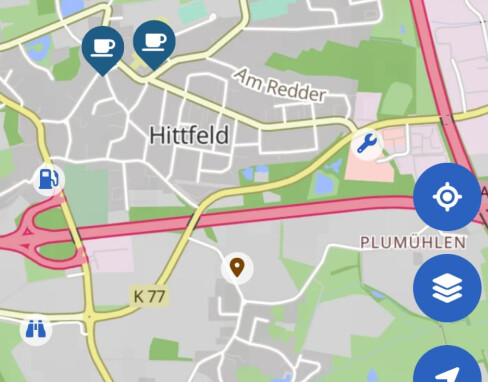
Here are icons from the program (petrol station, binoculars/viewpoint, workshop) that you can see if you have activated them in the settings, a separate POI and two larger coffee cups that appear because I was looking for cafés.
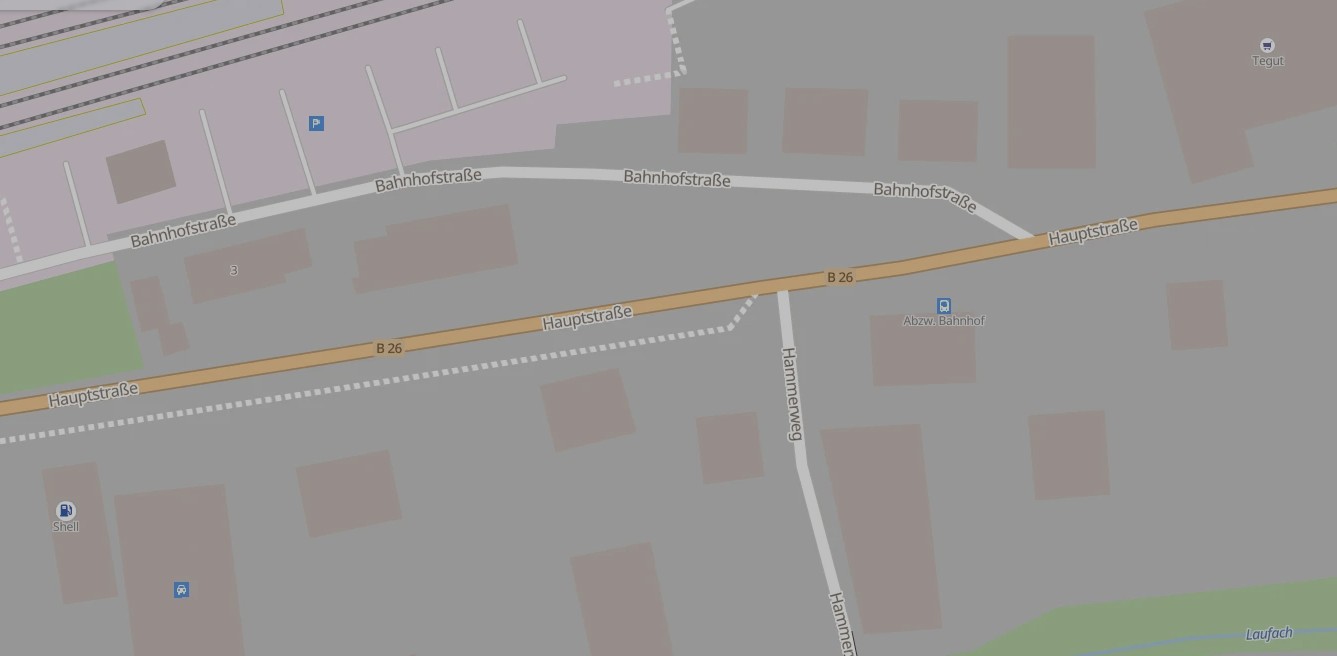
This is from the website however it is representative of what I was seeing while navigating. In the upper right corner there is a grocery store and in the lower left corner there is a gas station. Maybe double size would not be enough perhaps a way to adjust the size would be better?
The thing is, the available space depends a lot on your device. On many devices there is no or only very minimal space between these panels. That said, we are always looking into options to further improve the navigation display.
That depends if there was a via point in between or not. If there was a via point, then this is correct, if there wasn’t this might be a bug. If you believe this was a bug, please share your route, where exactly you went off and on route again and your debug string from the Kurviger app settings so we can have a look into this (idealy as a separate thread )
Yes that is correct. The POIs like passes or hotels are only shown during the planning and not during the navigation. If you would like to change your route and add more POIs to your route, you can pause the navigation and replan your route quickly in the route planning view .
I think the landscape mode on an 8" device needs tweaking to be optimal. I do hope you will consider my suggestions.
Before I possibly open a separate thread (I need to check for the via point) I have an idea. I believe it would be better if there was a prompt asking if the route should be continued or backtrack to any waypoint or via points that were missed.
The other thing I remember is I could not stop the navigation without force closing the app since the control buttons on the lower right side of the screen were no longer there.
And the app repeatedly kept telling me it could not reroute because I was offline. I knew this after the first warning and did not need this repeatedly spammed on the screen. I believe a popup would be a better notice and then the rider can clear the message and not have the screen spam. Or leave the message on the screen until the rider touches the message to clear it from the screen.
I would be interested in having an option available that would show the POIs while following the route since I do not place all POIs into the travel plan. If I am ahead of schedule then I am more likely to consider additional stops and seeing them on the screen allows me to find them.
Yes, under ideal conditions . But not if the Internet connection is poor or non-existent .
Then you have to drive off the route to the desired point, for example. And then the layout of the zoom, map, roads, POIs and location is very important in navigation. For this some improvement should be done.
Edit 1: Not only the layout - mentioned above - is important in this situation. Also additional the appearance and area of the buttons and info panels are very important.
If you missed the VP, you have the option to skip it. I am not sure if an additional prompt is needed for this, might be just irritating as you would have to take the decision every time. On the other hand, you can choose to skip, only when you want to.
With shaping points it is a different story - there are different opinions if those should be skipped automatically and under which conditions, but this was already discussed in another thread. I’ve setteled with “it works as it works” for now and try to be aware of the behaviour while planning.
Often when I post here I do not feel like the Kurviger team is listening.
These concerns where not addressed.
The other thing I remember is I could not stop the navigation without force closing the app since the control buttons on the lower right side of the screen were no longer there.
And the app repeatedly kept telling me it could not reroute because I was offline. I knew this after the first warning and did not need this repeatedly spammed on the screen. I believe a popup would be a better notice and then the rider can clear the message and not have the screen spam. Or leave the message on the screen until the rider touches the message to clear it from the screen.
If things stay the same then the above two problems will just repeat time after time. Kurviger claims to have an offline mode which does not work from my prospective, sure you can download maps however what good is that with the above problems? And the online mode only works if you always have a solid connection to the Internet from what I understand. So even if I could put my device on the Internet the problem is only masked until I loose Internet and then the problem could pop up again.
So if / when this happens in the future I should force close the app, reload Kurviger and then I can continue my route? Or is there a better way?
I disagree. @boldtrn (=“Kurviger Team”) tries to understand and answer all user remarks timely and is gratefull for every constructive input. One thing you should not mix up “Kurvinados” are not members of the “Kurviger Team” and if you think “Kurvinados” are not listening or responding - that is normal. “Kurvinados” are just Kurviger users that may have more experience in one or the other aspect of the App, but have no insight into the planing of new features, to-do lists, source code or anything like that. “Kurvinados” try to help in their free time with their knowledge and experience, and will not comment on all your remarks.
With this, I also have to disagree. Kurviger does not claim to have “offline mode”, it offers the feature to have the offline maps, but for route recalculation it needs Internet. Yes, for me it is also inconvinient as is was inconvinient that it did not have Android Auto last summer, but now it does and I guess we just have to be patient to get that offli e recalculation. It is not a small feature to develop.
For other questions and concerns, I guess the Kurviger Team will respond soon.
I guess offline mode is my misunderstanding. Just to be clear I am not asking for an offline feature to be developed. I was asking about improving the way the app responds to route detours. I’ve already made suggestions so I will not repeat them again.
You mean the blue buttons were gone? The pause navigation button is shown after pressing the ...-button.
Ah yeah, we might have to improve this, thanks for letting us know. Unfortunately offline is not always straight forward and if there is an issue with the route calculate, we should show this to the user. I don’t think it should be a popup that requires manual interaction, but yeah, maybe we reduce the number of messages. They are already pretty small, but I can understand that they might be still a bit annoying.
I am sorry that you feel this way. We try to incorporate all feedback. That said, please understand that we can’t always change things immediately, we do have our roadmap and need to integrate features and prioritize as it fites.
I still don’t understand the issue with the missing buttons, so if these were really gone then this is a bug and we should fix this on our end.
Yes, none of the blue buttons on the lower right hand side were there or the ...-button was covered by the repeating message. If I am remembering correctly the buttons were gone. The detour was about 6 kilometers long.
The route calculation was fine. There was an unexpected road closure.
Suggestion, have the messages stop after 3 times and then reset once back on route or the Internet is back up so it can trigger again.
That is not my expectation.
A bug it is then since I could not get to the End / Pause Navigation button. At the time I thought I would just end the navigation and restart to continue the route.
I could upload the route and give you the GPX coordinates for where the detour begins, detour route and when I was back on route (detour ends) if that helps?
The route was created in Kurviger web planner to test importing. I decided to test Kurviger with downloaded maps while offline. My tablet has one slot for a SD card (currently inserted) or SIM card. Just fixing the bug and being able to end navigation and then restart would improve the offline mode. It is a pity though that there is no way to continue the route. Also someone asked and I did skip a shaping point because of the detour.
While I am thinking about it, the Kurviger team has done a great job with the exporting GPX file function. It is the best I have tested so far. Congratulations!
I did not yet experience the blue buttons disappearing in the navigation mode, but I did in planing mode (already reported, it is an edge case).
If they really do disappear again (make a screenshot, as Robin suggested), you can try to access the navigation menu by pressing the “Back” button. This is the one of the three Android buttons that may or may not appear at the bottom or side of the screen (depending on your device settings). “Back” button is also available on several remote controllers if you choose to use one. I am not sure if this feature is really documented anywhere (I am mostly not reading user manuals - just push buttons randomly ), but I am glad that it exists to support remote control at least partially.
I was not able to reproduce using Mock Locations and GPX test files. I will have to take a test ride and will post it in the bug section if I can reproduce differently from below.
While testing with Mock Locations I noticed the following behavior (this is reproducible). The route calculation failed message pops up every three seconds, non stop. It also covers the ‘…’ button for three seconds making it unreachable during the three seconds. It is possible I could not tap on the button when I wanted to and forced close the app. In my defense it was starting to rain at the time so I was in a hurry to return home.
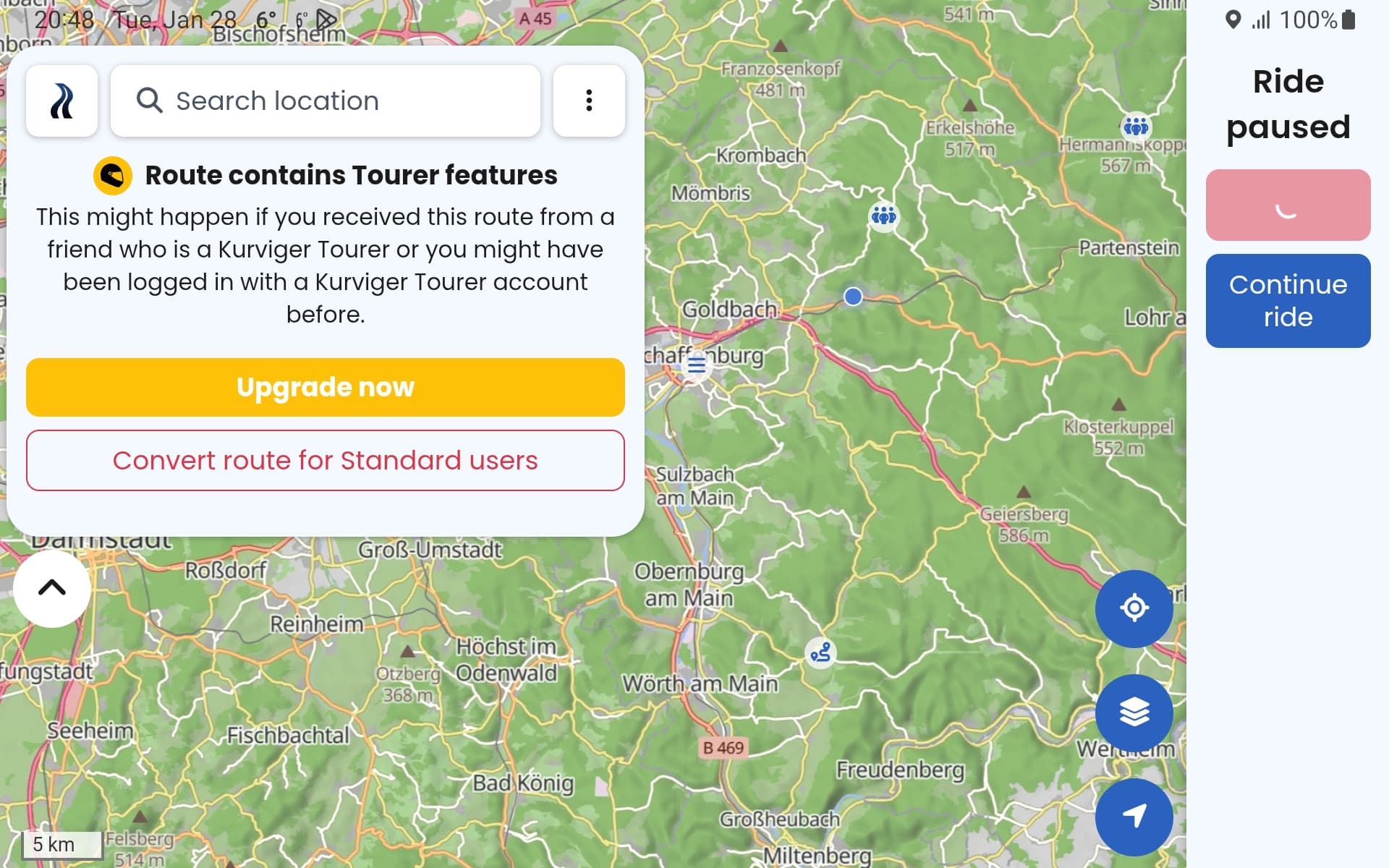
If you wait you can reach the ‘…’ button to cancel the navigation. Then the screen below comes up. From here you cannot continue to cancel navigation. Just the spinning quarter circle icon. And when you wait long enough the ‘Route contains Tourer features’ message pops up.
I can understand you may not want to change the apps behavior when offline however with some tweaks it would be more friendly to the occasional loss of Internet during a detour and for users that would like to use the app offline. Screenshot below.
The blocking of skipping a Via-Point to get back on the route is what causes the above problem. I would recommend allowing skipping of Via-Points when the user wants too. The whole scenario above could be avoided if the Via-Points could be skipped when back on track.
Also please do something with the route calculation failed message. There is no need to be told every three seconds non stop that the Internet connection has been lost.
I hope this is helpful.
Thank you for the tip! I will check out how to use the .Kurviger file type.
Using Mock Locations I was able to reproduce what actually happened, posted above. I no longer believe the buttons disappeared since I could not reproduce with Mock Locations. I will be testing again in the future and will take a screen shot if it happens.
I am planning on a controller if I can find space to fit it on the bike.
You can skip them.
But i think you use to many VIA-Points.
Use them only for Points you realy want to drive there.
For modeling the route please use shaping points.
They are exactly for that, and the will be skipt automatily after reenter the Route.
I do this since i use kurviger and it works, because most of my rouutes have Start, one via where i meet my friend and then The target point.
All without recalculation
Try it and have fun.
That is a great point and due to my lack of knowledge with Via-Points and Shaping Points. These points do not appear to be common in most nav apps. So Via-Points only for places I want to stop. Shaping points only for shaping the route. And I will think this way in the future. Then the question becomes how will other nav apps react to the different points. I am currently considering three nav app solutions, Kurviger has the least pain points if I can resolve running without Internet. All nav apps have their own shortcomings. Then the question becomes how painful is it to work around the shortcomings.
I do believe that this would solve many problems however there will still be times when one may need to skip a Via-Point because of a road closure and time constraints. So I do believe skipping Via-Points is needed.
 )
) . But not if the Internet connection is poor or non-existent
  .
.