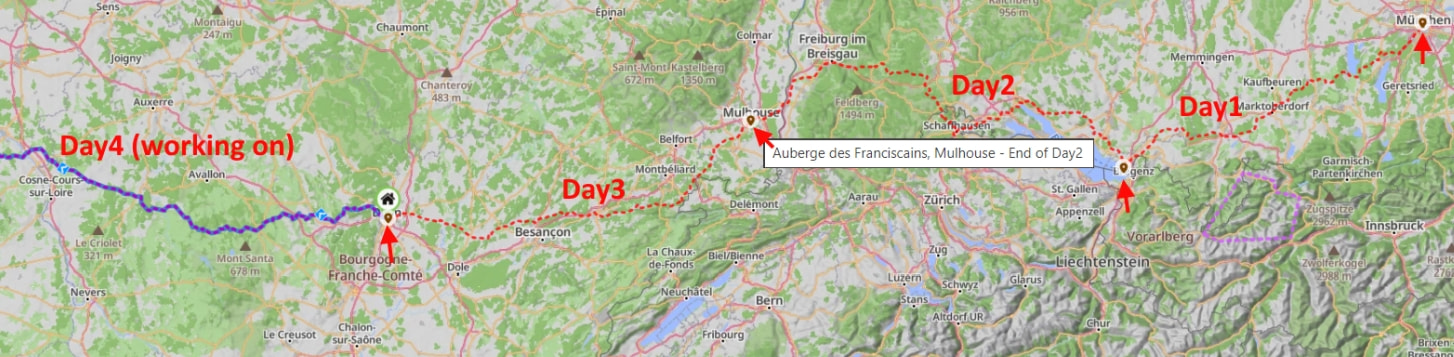
I create a multi day tour route with each day being one route. My current plan has about 26 days. I sometimes want to see all of them on the Map as Overlays. This is for hotel planning and to choose the best place to stop for a two day break. The problems is the Map Overlays do not show where one day begins and ends. The breaks should always be where that day’s route ends. I would like to see an icon showing the beginning and ending of each route showing on the Map when the routes are Overlays.
I would also like to see a popup with the route name when hovering over the route on the map (Overlay).
Thinking a little bit you get a solution with existing features.
Put a favorite at each end of your 26 routes and name it like “end of day 17”. Then add the favorite folder (and for sure your routes folder) in Overlay. With mouse over you see the name of each favorite. Here an example:
Thank you, that is good as a temporary workaround. It is not user friendly. Computers should make our lives easier and not add to our workload by making users jump through hoops to get the desired results. And then there is the unneeded clutter in the Favorites folders.
Hello @SonWon
Thanks for your input! We already have something like “2.” on our list. However, “1.” is something we should take into consideration too then
Hopefully the suggested workaround works for you too for the time being