Is there a way, similar to how it works with gas stations, to display restaurants while navigating? Background: the route is planned and we want to stop after about 1 hour, so it would be ideal to be able to see upcoming restaurants.
You mean something like this, but then visible in the navigation?
This is a search “along the route” for gastronomy, without any further specification.
Shouldn’t it be labeled or further specified then?
For example, I would exclude McDonald’s and Burger King in such a case, while others might prefer them.
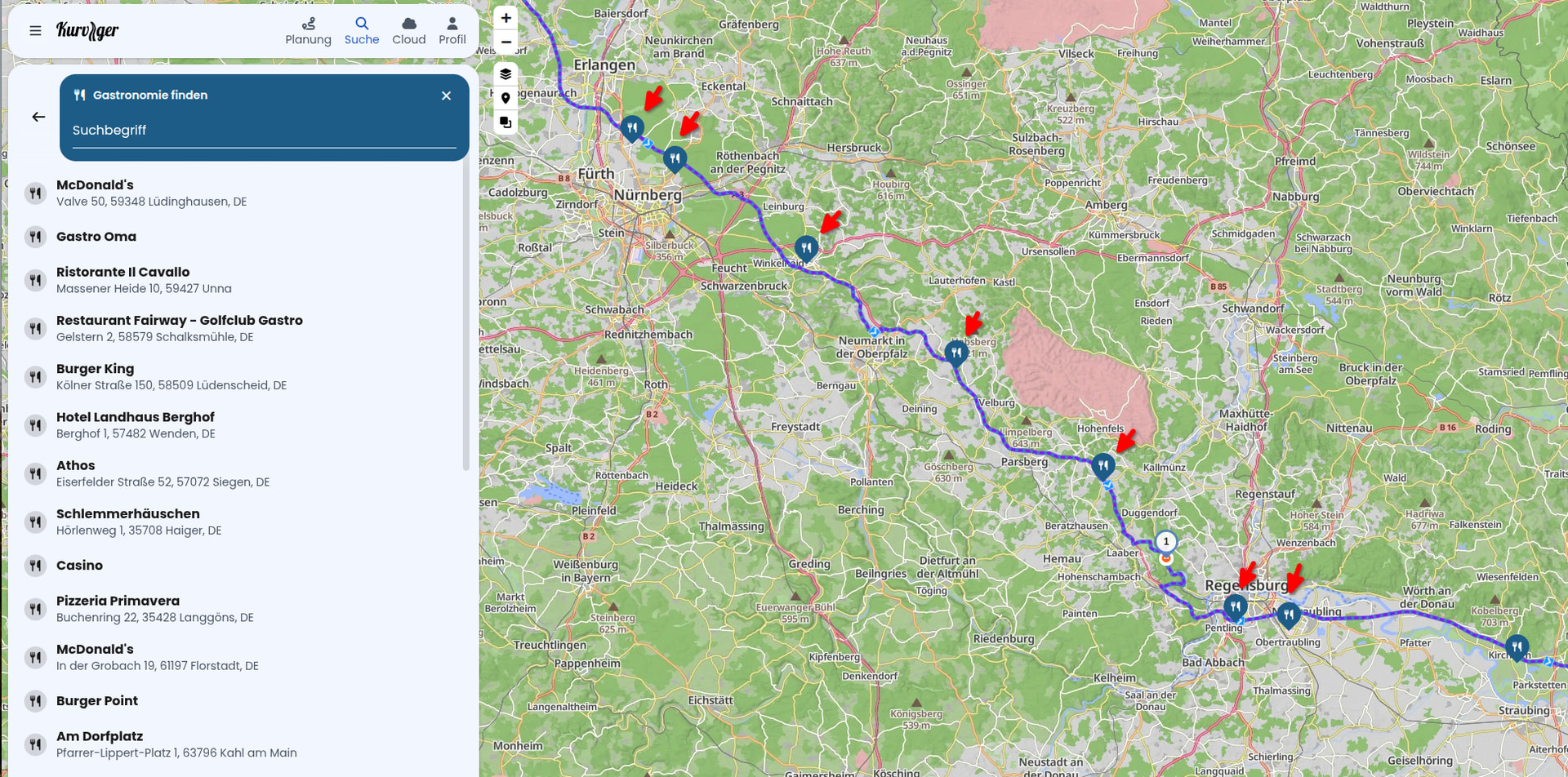
In general, I’d like to have something like this as well — having the search results of a category in this form within the navigation 
I think this topic is already being discussed in other threads.
I would also like a view like that for POIs (restaurants, gas stations, sights, etc.).
Hello @Daniel_Hunziker,
Currently, this is not possible directly in the navigation. However, with two clicks you are in the planning view and can, as mentioned above, search for a restaurant using Search along route, further specify it, view details, etc.
To better understand your use case: You are already on the road and want to spontaneously plan a restaurant stop (just like with a gas station), following the motto: „In an hour, we want to grab something to eat.“?
I think that for a restaurant, even more information might be important than for a gas station (cuisine, rating, etc.) and therefore it might not just be a matter of distance. For this reason, in my view, it might not make sense in such a reduced function as “Find gas station”.
I do my restaurant research either at home or during a tea break and set 2–3 via points with alternatives (which is why I need the SKIP function a bit more often than one might expect).
If I were to search for a restaurant directly from the navigation, I probably wouldn’t care what I get to eat. Then a gas station or the first restaurant I see along the way might be enough for me…
Maybe over time we could build a restaurant database „recommended by Kurviger users“, so that at least you know — there is enough parking, the food is good, and the people are friendly. Such a search would make a bit more sense during navigation.
Right, we define how long we will drive on the planned route each time we start,
A POI option for restaurants that can be further refined via settings for what you want to see:
- Bar
- Restaurant
- Café
- ..,
Each with a different icon (similar to Google Maps)?
Gas stations can be seen as icons with a plate [translator note: likely referring to a POI symbol like cutlery or a service sign] in the navigation and can be “searched” for visually during navigation and headed towards. While they are not part of the route, in most cases that’s completely sufficient (and also the purpose of this view).
I imagine saving the search results for cafés, gastronomy, and also supermarkets as favorites strictly in the context of the planned route, and then seeing them while driving, similar to the gas stations mentioned above.
While driving and navigating, I don’t want to explicitly search; it’s enough to recognize that one of the desired places is coming up shortly.
Recently in Great Britain, I went to the trouble of sequentially integrating the search results as WPs [waypoints]. It’s a lot of work, but brings little added value.
In a local favorites folder with the results, I can then delete or disable unwanted hits if necessary.
That is a really cool idea!
I’ve occasionally extracted POIs from OSM for a target area and imported them separated by categories as favorites or loaded them as an overlay. But this approach really has a lot going for it.
But why „local“ — no cloud synchronization?
Local in the sense of „only along the planned route“.
Search results along the route are probably not very useful for other routes.
And if I share this route, I also share the „local“ favorites
Yeah, now it all makes sense, perfect!
I’m not sure if I understood. Do you mean that—when I search for something along the route—I get an option to save the search result to a favorites folder? Or do you mean that the points are saved with the route?
Somehow both. I’m not sure if the term folder should be used here.
“the search result” is part of the route, but the points are not on the route.
On the other hand, WPs are on the route (where else  ), but are again not organized in a folder.
The term list might be better.
- WP list (Result of my route planning)
- Favorites list (Result of my search(es) along the route)
I also see the following point: If during navigation I really want to have a favorite from the search included in the route because approaching it visually is complicated, I can in turn plan this from the list. In planning mode, or in an advanced gas station search in navigation mode. Saves me the search during the tour 
Even crazier would be: The search always runs in parallel and implicitly with route planning, as they are usually the same concerns. But I don’t want to overdo it now.
I don’t think it’s crazy at all. For example, you could have a hierarchical list where the desired POIs are checked (Shops - Supermarkets - Edeka). When I replan a route, the search is triggered, or during recalculation in navigation. That then moves into something like a “dynamic” overlay. From the overlay, I can select things for planning. In navigation, the overlay is displayed. That way, planning and navigation also remain separate for now.
The gas station search intentionally offers only a limited number (5?) of gas stations to keep operation in navigation mode as simple as possible.
In contrast, the list of search results along the route is often relatively long. In navigation mode, one would then also have to shorten the list, but based on what criteria?
I would also think it’s good if you could save the search results of the search along the route in a favorites folder and then display them as an overlay. Something similar to an integrated version of Overpass-Turbo, just without complicated query syntax, without GPX, and without import.
I don’t find it crazy at all, quite the contrary.
Basically, what @Thoka is describing is the adaptation of the “extended track navigation” concept, which is currently being implemented very successfully by DMD and Stegra.
Since it’s track navigation, there are no VIA points there. Instead, there are two “lists”:
-
a static list of POIs that have been explicitly assigned to the route; these POIs can either be on the track or miles away
-
up to three dynamic lists for one POI category each, which are constantly updated while driving and contain the respective POIs within a corridor along the track
From the static list, always the next one, and from the dynamic lists, also the next one (Stegra) or the next three (DMD) in the “direction of travel” are displayed while driving (with ETA information), and these can then be added to the active navigation with a single click.
If this concept were suitably integrated into Kurviger (there is already the approach with the “fuel station search”), you would have a hybrid solution here that, to my knowledge, would be unique. I use both route and track navigation quite intensively; such a fusion would be absolutely fascinating.
I believe it’s 50 km, which is a well-chosen distance for when you “need to refuel”.
For planning into the route, a reduced range is also sufficient here (coffee, rolls, Wi-Fi …). The POIs can still be there for the entire route (> 1,000 km), but for the function of planning into the route, the objects of the next 50 km are enough.
I wouldn’t loop in a café that is only 500 km away.
The POIs along the route would also be available offline, that helps too
if you are riding in a group, every stop is a “disturbance”, which is why dynamic loading would be great; the driver shouldn’t have to operate Kurviger, and I think 50 km or even 30 is enough.
If this is implemented, Kurviger should at the same time allow users to rate the POI (scale 1-5). Currently I manage with Google, but that is quite a bit of overhead. Once you’ve found that hidden gem along the way, it’s always worth the 5 minutes to leave a review. And for Kurviger, it’s a soft lock-in because it increases the app’s added value. For the implementation (modeling), I would use a triple store and manage it separately from the OSM store, then connect it to the OSM data via linked data (about). That would really be a great feature!
Something like that is already on our list.
The problem with a rating is that what is junk to one person is a must-have for another. That’s why I prefer Google, because based on the reviews I can see why someone views it positively or negatively.